

On Android, you configure the corporate wallpaper from Applivery's Advanced Launcher, using the image URL. You don't need to lock the Device down in kiosk mode: Launcher mode is enough.
Unlike Windows and macOS, Android Policies don't have a standalone wallpaper setting. The wallpaper is part of the personalization of Applivery's managed launcher, which replaces Android's default launcher and supports configurations the native launcher doesn't.
Requirements
Requirement | Details |
|---|---|
Management type | Fully Managed Devices |
Feature | Advanced Launcher (Launcher or Kiosk mode) |
Minimum Android version | Android 8 (Advanced Launcher requirement) |
Image | Hosted on a web-accessible host; provided by URL |
AOSP | Supported: the Advanced Launcher works on AOSP exactly as on Fully Managed (AMAPI) Devices |
The Advanced Launcher replaces the Device's launcher. If you only need the wallpaper and want the Device to keep behaving like a normal Android Device, use Launcher mode, not Kiosk mode.
Launcher mode or Kiosk mode
Both modes support the wallpaper, because personalization is part of the Advanced Launcher's general settings.
Mode | What it does | When to choose it for the wallpaper |
|---|---|---|
Launcher | Applivery's managed launcher, without kiosk restrictions | General-purpose corporate Devices that only need branding and extra controls |
Kiosk | Locked multi-app kiosk | Dedicated Devices (retail, signage) where you also want to restrict usage |
Configure the wallpaper
Upload the corporate image to a web-accessible server and copy its URL.
Once in the Applivery Dashboard, go to Policies 1 and open the Android Policy you want to change, or create a new one.
In the left-hand menu, click Kiosk and switch to the Advanced Launcher 2 tab.
In App operation mode 3, select Launcher, or Kiosk if the Device needs to be locked down.
Under Personalization, fill in the Wallpaper 4 field with the image URL.
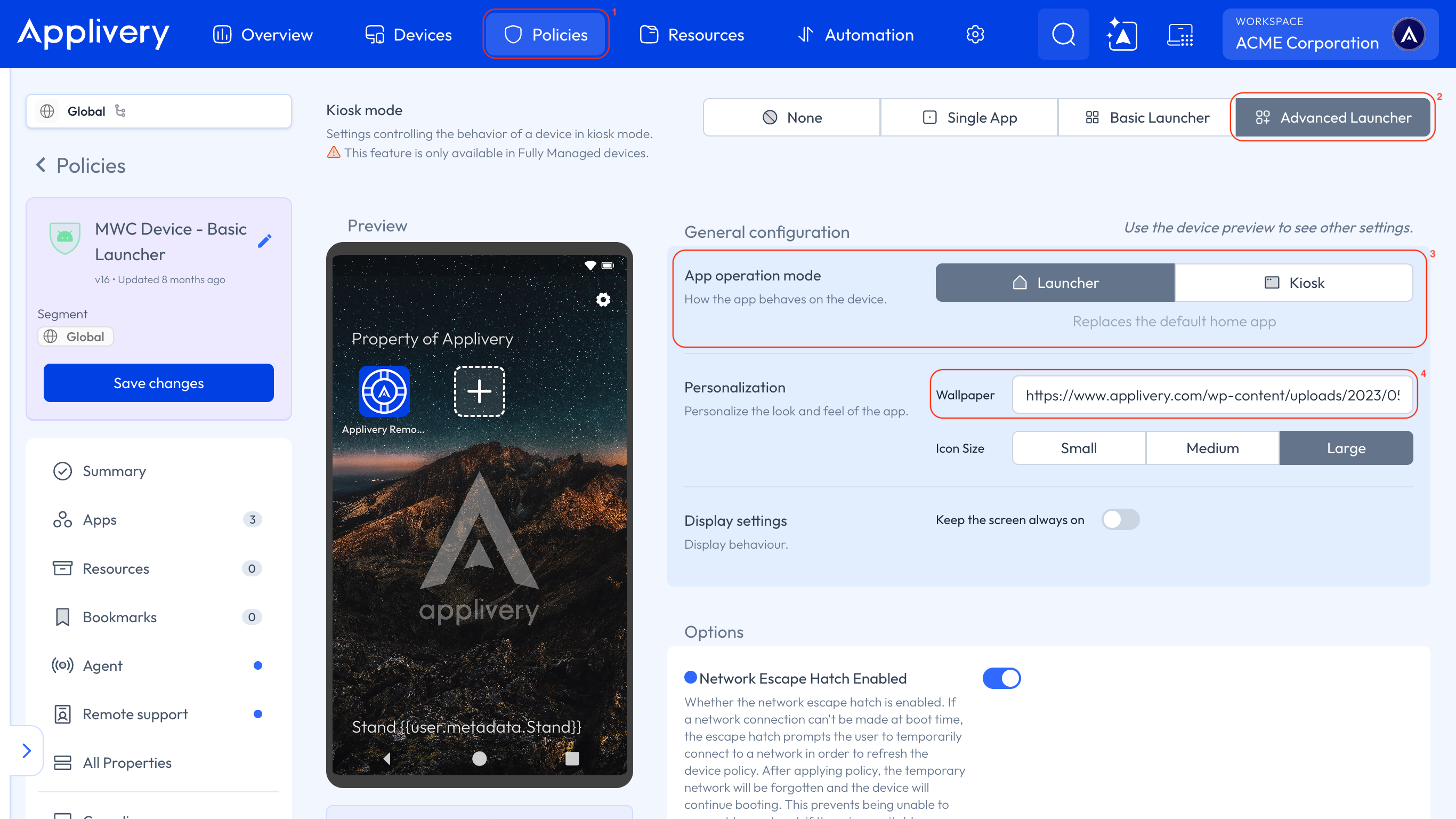
Save the Policy and make sure it's assigned to the target Devices.
The wallpaper is applied through Applivery's launcher layer, not Android's native launcher.
What else you can customize in the same section
Under Personalization, you can also set the Icon Size (Small, Medium or Large), the App layout and Folders. The interface also supports a text Header and Footer, which can include dynamic variables such as the Device serial number, the IMEI, or the user. You'll find all the details in Kiosk Mode.
If the wallpaper isn't applied
Check the management type. The Advanced Launcher is designed for Fully Managed Devices.
Check the Android version. The Advanced Launcher requires Android 8 or later.
Check the URL. It must point to a web-accessible host where the image is stored. Open it in a browser outside your corporate network to confirm.
Check that the Policy is assigned to the Device and that the Device has received it.