

Applivery provides full MDM for AOSP (Android Open Source Project) and other non-GMS Android Devices, bringing the same Device Management capabilities to rugged terminals, kiosks, and industrial hardware that ship without Google Mobile Services.
AOSP MDM is the right choice for rugged Devices, industrial PDAs, point-of-sale terminals, digital signage, and any OEM Android build not certified to run Google services. Unlike Android Enterprise, it requires no Google account, no Android Enterprise setup, and no Managed Google Play organization. Everything is managed from the same Applivery Dashboard.
The Applivery AOSP Solution
Applivery's AOSP MDM solution is built around three components:
The Applivery DPC — an on-device agent that runs as Device Owner and applies every Policy set in the Dashboard through the native Android
DevicePolicyManagerAPIs.The Applivery Self-Service — hosts and silently installs APKs without any dependency on Google Play.
A real-time command channel powered by Pushy — dispatches remote commands to Devices and reports results back to the Dashboard.
The Applivery DPC plays the same role that Android Device Policy plays in standard Android Enterprise deployments, but it does not depend on any Google service, account, or Play infrastructure.
Key Capabilities
Management Sets
Applivery supports two management sets for AOSP Devices:
Full Device Management — provides full MDM and App management for granular control over company-owned AOSP Devices. Choose from 80+ settings to enforce, including password complexity, keyguard restrictions, Wi-Fi configuration, runtime permissions, hardware controls, and more.
Dedicated Device — transforms company-owned AOSP Devices into purpose-built terminals. Lock them down to a single App or a curated suite of Apps, and enforce an extended range of security Policies — power button, navigation bar, status bar, system error dialogs, and Settings access — to prevent users from escaping the locked experience.
The Applivery Self-Service
Because AOSP Devices do not have access to Google Play, all App distribution goes through the Applivery Self-Service. It is Applivery's replacement for Managed Google Play on AOSP Devices, and it provides:
Private App distribution — upload APKs directly from the Dashboard.
Silent install, update, and uninstall with no user interaction required.
Per-App managed configuration applied silently through the DPC.
Per-App runtime permission Policy.
Block uninstall and disable user controls.
Compatibility checks and automatic rollout to all enrolled Devices that match the targeting rules.
Get started
To begin managing AOSP Devices with Applivery, you do not need to set up Android Enterprise, link a Google Workspace account, or create a Managed Google Play organization. Everything you need is on the Applivery side.
QR-code provisioning is the only supported enrollment method, for fleet rollouts and one-off enrollments alike. The enrollment token cannot be injected through ADB. Once enrolled, each Device appears in Device Management > Devices with its display name, model, Android version, and the Policy that was applied. From there, you can manage Apps, run commands, edit the Policy, and review status reports.
Feature list
The Applivery DPC operates as Device Owner using the native Android APIs, so every feature below works on any AOSP build that ships those APIs — regardless of whether Google services are present.
Device security
Device security challenge — set and enforce a PIN, pattern, or password of a defined type and complexity.
Advanced passcode management — minimum length, letters, numerics, symbols, upper/lower case, history, expiration, and wipe threshold.
Remote wipe and lock — remotely lock and disenroll Devices.
Compliance enforcement — apply enforcement rules (block, then wipe) when Devices drift out of compliance.
Default security Policies — debug features and installs from unknown sources are blocked by default.
Security Policies for dedicated Devices — users cannot escape a locked-down Device.
Hardware security management — disable factory reset, safe boot, USB data transfer, physical media mount, NFC beam, and camera.
Memory Tagging Extension (MTE) Policy and Common Criteria mode on supported Devices.
App Management
Silent app distribution — install, update, and uninstall Apps with no user interaction.
Managed configuration management — view and silently set managed configurations for any App that supports them.
App catalog management and allowlisting — configure the work Apps catalog by allowlisting or blocklisting Apps.
Device Management
Runtime permission Policy management — set a default response (Prompt / Grant / Deny) and override per App per permission.
Wi-Fi configuration management — silently provision enterprise Wi-Fi (Open, PSK, EAP-TLS, PEAP, TTLS).
Wi-Fi security management — identity, client certificates, CA certificates, domain suffix match, SAN matching.
Advanced Wi-Fi management — lock down Wi-Fi configurations on managed Devices.
Account management — block users from adding or modifying accounts.
Accessibility services management — control which accessibility services can be enabled.
Location sharing management — force HIGH_ACCURACY, SENSORS_ONLY, BATTERY_SAVING, or OFF.
Factory reset protection management — protect Devices from theft or disable as needed.
Advanced app control — block uninstall, disable force-stop and data clearing through Settings.
Screen capture management — block screenshots and screen sharing.
Disable cameras.
Reboot the device remotely.
System radio management — control mobile network, roaming, calls, SMS, tethering, Wi-Fi timeout, and Bluetooth.
System audio management — mute, block volume changes, block microphone unmute.
System clock management — control clock, timezone, and automatic settings.
Advanced dedicated device features — disable keyguard, status bar, notifications, and quick settings; force screen on; prevent Toasts, system alerts, and overlays.
Device usability
Lock screen messages — custom message on the lock screen.
Policy transparency management — short and long support messages shown when users hit a restriction.
System update Policy — automatic, windowed, or postponed OTAs.
Kiosk mode management — pin one or several Apps to the screen.
Keyguard feature management — disable camera, biometrics, fingerprint, face, trust agents, notifications, and shortcuts.
MAC address retrieval — silently fetch the device MAC address for inventory.
Advanced lock task mode management — control home button, recents, global actions, notifications, status bar, and keyguard while in kiosk mode.
Advanced system update Policy — freeze periods for blocking OTAs during specified date ranges.
COPE Permissions on AOSP Devices
The Applivery DPC on AOSP runs as Device Owner only. There is no Work Profile and no COPE personal usage flow, so the permission limits documented for COPE Devices do not apply — every restriction you configure takes effect at the full Device level.
If you need a Work Profile / COPE split, use the standard Android Enterprise MDM flow on Devices with Google services.
Always-On VPN
Force all Device traffic through a corporate VPN, with optional lockdown mode and per-package exemptions.
Once in the Applivery Dashboard, head to Policies 1. Choose the Policy where you want to add the configuration.
In the left-hand menu, select Network and search for Always-On VPN Package 2.
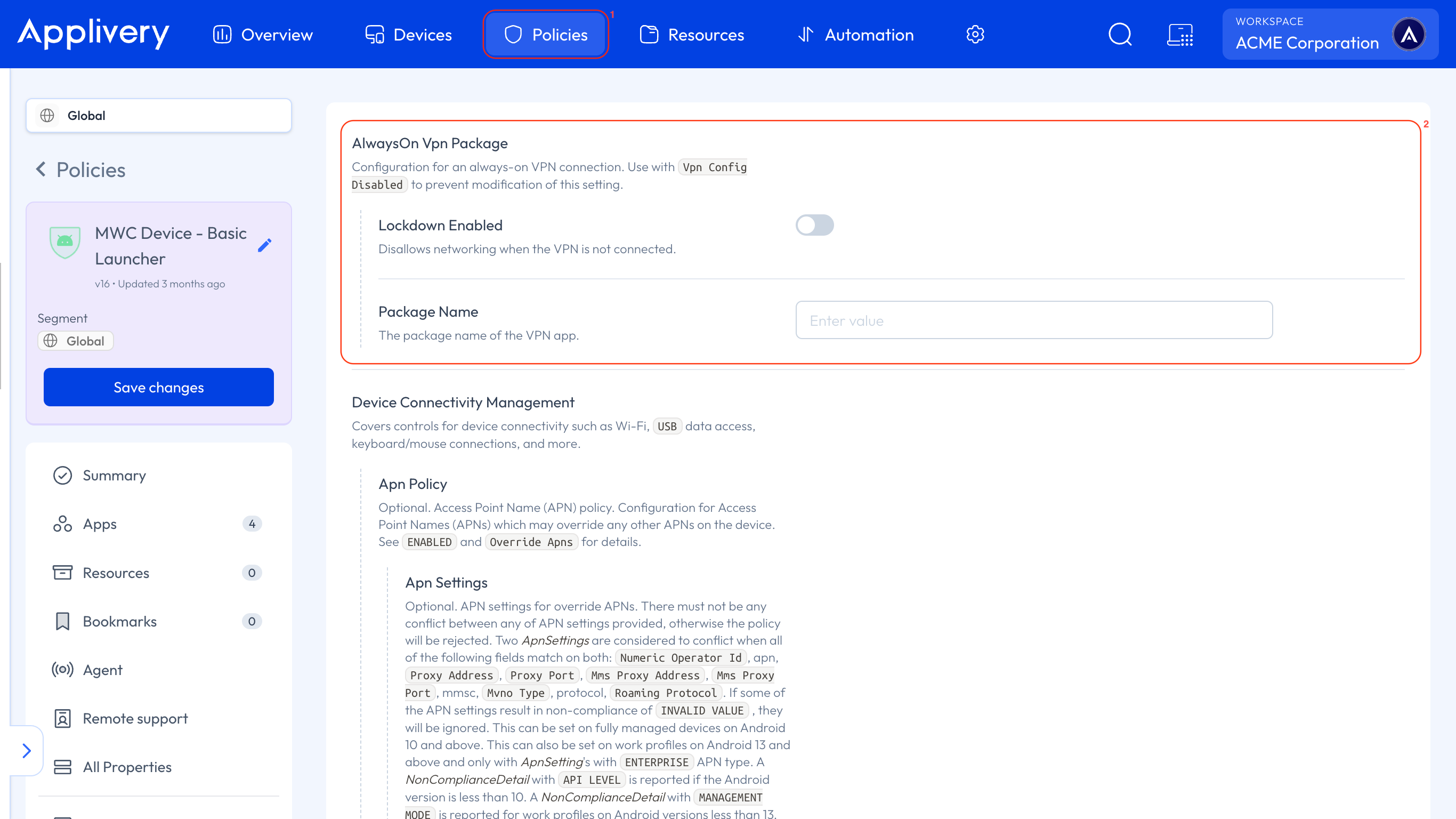
| Setting | Description |
|---|---|
| VPN Package | Package name of the VPN App to use as the always-on VPN. |
| Lockdown Mode | When enabled, all traffic is blocked if the VPN is not connected. Prevents data from leaking outside the tunnel. |
The VPN App must be force-installed through the Policy before the Always-On VPN setting takes effect.
Current limitations
Basic Launcher is not available. It depends on Android's native Device Policy Controller. Single App kiosk and the Advanced Launcher both work, and the Advanced Launcher needs Android 8 or later.
Managed Google Play web apps do not work, since there are no Google services behind them.
Remote Support is not available on AOSP Devices. It is in development.
A useful detail about lock task on AOSP. The DPC adds every App in the Policy to the lock task allowlist, and brings the one marked as kiosk to the foreground. That means you can ship your own launcher as an APK, set it as the kiosk App, and get multi-app access even on hardware where the Advanced Launcher is not an option.
In development
Remote Support & Control — remotely view and control AOSP Devices directly from the Applivery Dashboard.
Work Profile — Work Profile support on AOSP Devices, enabling a clear separation between corporate and personal data.