

Not every risk on a Device comes from a setting you can configure. A Device can follow every Policy you assigned and still not be trustworthy, simply because someone modified its operating system. The security posture is the signal that tells you when that happens.
It answers a different question from the rest of your Policies: not "is this Device configured the way I asked?" but "can I still trust this Device with corporate data?"
What the security posture tells you
Android Enterprise evaluates each Device and reports one of three values:
Value | What it means |
|---|---|
Secure ( | The Device is secure. |
At risk ( | The Device may be more vulnerable to malicious actors than is recommended for use with corporate data. |
Potentially compromised ( | The Device may be compromised, and corporate data on it may be accessible to unauthorized actors. |
Potentially compromised is the value you get for a rooted Device. It's worth treating as an incident rather than a warning: at that point you can no longer assume that the restrictions in your Policy are actually being enforced, because the operating system that enforces them is the part that was modified.
Where to find it in the Dashboard
Applivery surfaces the security posture in two places, at two different levels of detail.
In the device list
Every Device in the list shows a shield icon next to the Policy field. It's a summary of the Device's overall compliance checks:
Shield | What it means |
|---|---|
🟢 Green | The Device is compliant and its posture is Secure. |
⚪ Grey | Something about the Device needs attention, but it isn't the security posture. |
🔴 Red | The security posture is At risk or Potentially compromised. |
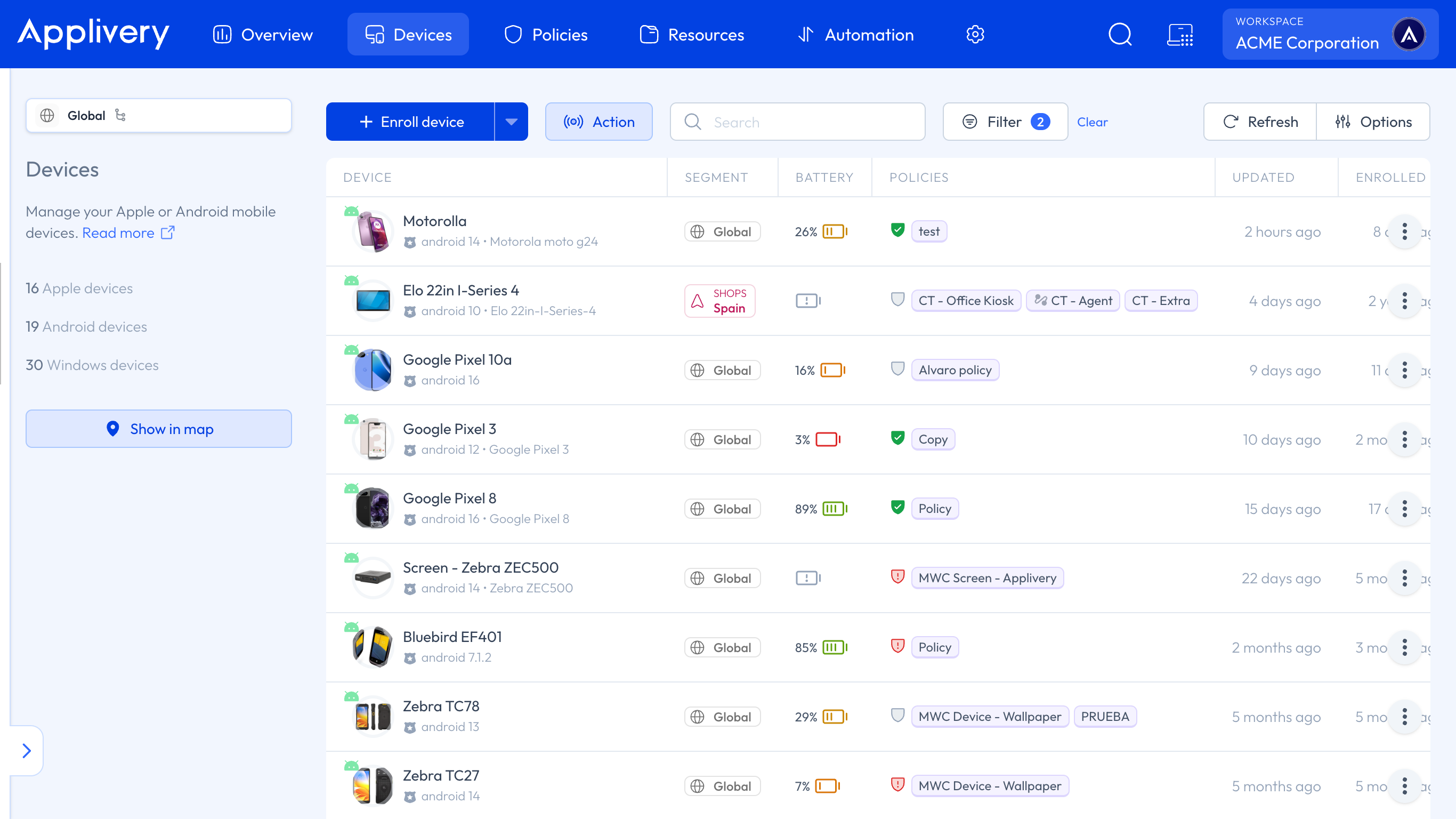
Two things follow from this, and both matter when you're triaging a fleet:
Red always means a security problem, never a pending configuration. Grey and red are different classes of issue and call for different responses — grey is operational, red is a question of whether the Device can still be trusted.
Both risk values raise the same red shield. To tell At risk from Potentially compromised, open the Device.
In the Device's Compliance checks
Open the Device and go to the Overview section, where you'll find the Compliance checks. A Device whose posture is at risk or compromised gets a check of its own, in red, titled with the posture value — At risk or Potentially compromised.
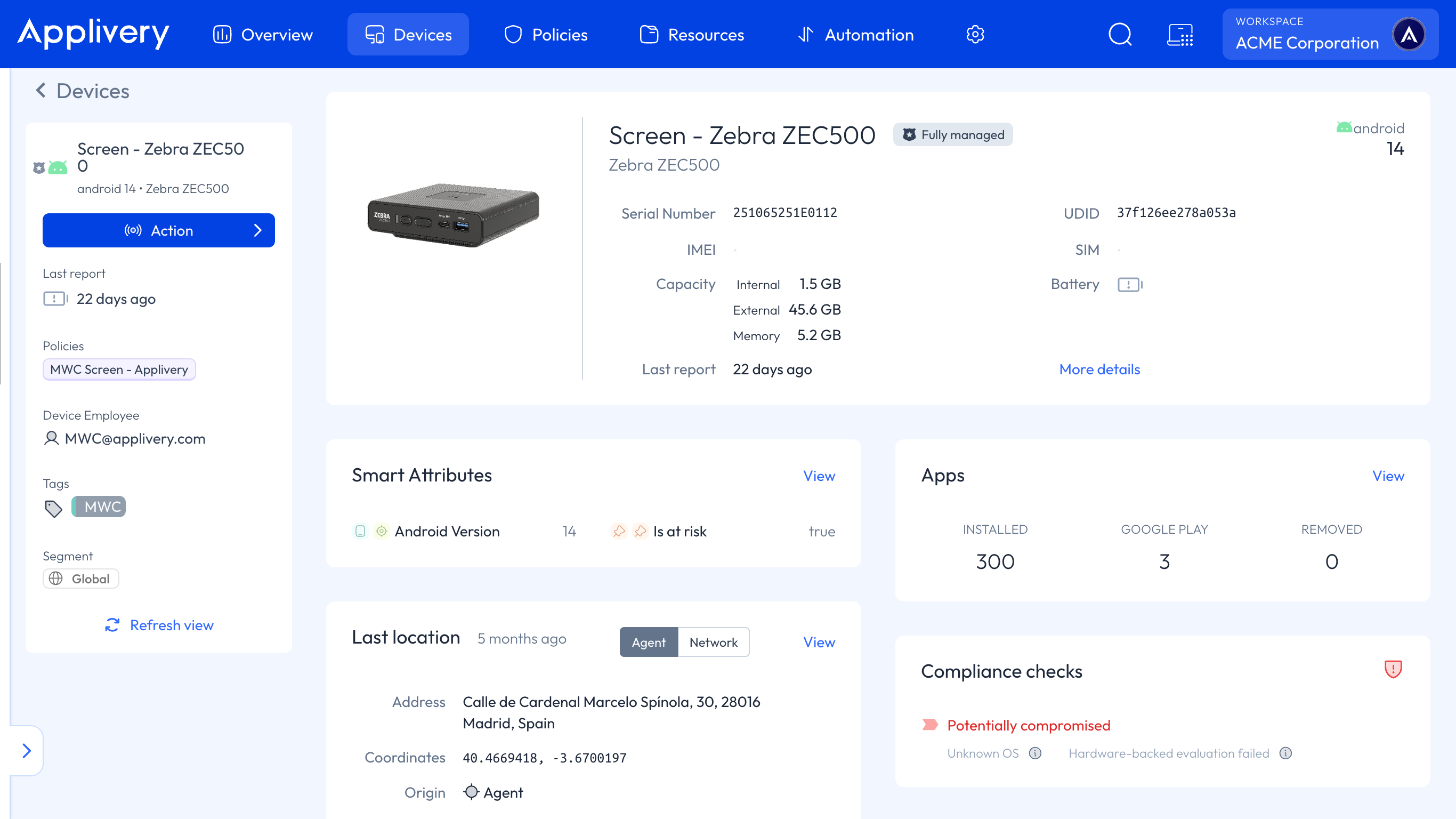
Inside it, for each risk detected, you get:
The name of the risk — Unknown OS, Compromised OS, or Hardware-backed evaluation failed — with a tooltip explaining what Play Integrity detected.
Google's advice for mitigating it, written for you as the admin. For example: "The user should lock their device's bootloader."
A Device reported as Secure gets no security check at all. Here the absence is the good news — there's no green entry confirming it, so don't read "no security check" as "not evaluated".
Why a Device is flagged
When the posture isn't Secure, the specific risk behind it is one of these three:
Risk | What Google detected |
|---|---|
Unknown OS ( | The Device is running an unknown OS: the |
Compromised OS ( | The Device is running a compromised OS: the |
Hardware-backed evaluation failed ( | The Device doesn't offer a strong guarantee of system integrity — the |
There's a fourth value, Unspecified security risk (SECURITY_RISK_UNSPECIFIED), shown when Google doesn't narrow down the cause. It isn't actionable on its own.
All three come from Google's Play Integrity API, which is the component that actually inspects the Device. Applivery reports the verdict; it doesn't produce it.
Because the evaluation happens on Google's side, the posture is a report, not a setting. There is nothing to enable in a Policy to turn it on, and no value you can configure to make it stricter.
AOSP Devices have no security posture
The Play Integrity API is part of Google Play Services. AOSP Devices — the non-GMS builds common on rugged and industrial hardware — don't have Google Play Services, so there is no integrity signal for Android to report and no posture for Applivery to display.
This isn't an Applivery limitation, and no MDM can work around it: the component that performs the check simply isn't present on the Device. If you need integrity or root detection on an AOSP fleet, it has to come from a third-party Mobile Threat Defense (MTD) solution.
Acting on a compromised Device
The security posture reports a risk — it doesn't act on it. Blocking or wiping is a separate decision, and you have three routes:
Remote commands, applied manually from the Dashboard: lock the Device, reset the password, or wipe it. This is the direct response to a Device you've just seen flagged.
Policy Enforcement Rules, for automatic block and wipe actions after a number of days. Note what these react to: a Policy setting that can't be applied on the Device — not the security posture. They're a useful complement, not a consumer of this signal.
Automation Rules, to apply a restrictive quarantine Policy automatically. These act on Device Audiences, which are built from tags — so you need something to tag the Device first. That's what a Mobile Threat Defense integration such as Check Point Harmony Mobile provides: its risk groups map to Applivery tags, the tags feed a Device Audience, and the Automation Rule applies the quarantine Policy.
An Automation Rule can't wipe a Device. Its only actions are applying a Policy and adding a Smart Attribute — it configures Devices, it doesn't send commands. If a compromised Device needs wiping, either do it manually with a remote command, or have the quarantine Policy carry its own Policy Enforcement Rules to block and then wipe. Don't promise a one-step "MTD detects it, Applivery wipes it" flow, because that isn't what happens.
Security posture and compliance status are not the same thing
These two are easy to confuse, and the difference matters when you're explaining a flagged Device:
Security posture | Compliance status | |
|---|---|---|
Question it answers | Can the operating system be trusted? | Does the Device meet the Policies I assigned? |
Who decides | Google, via the Play Integrity API | Your Policy configuration |
Typical cause of a problem | The Device is rooted or running a modified OS | A required setting isn't applied, or the user changed something |
Can you configure it? | No — it's reported, not set | Yes — it follows the Policies you define |
A Device can be perfectly compliant and still be Potentially compromised, and that combination is precisely the one worth watching: everything looks correct, but the layer enforcing it can no longer be trusted.