

All Android devices enrolled in Applivery MDM have their storage encrypted by default, thanks to Android's File-Based Encryption (FBE). The encryptionPolicy setting lets you define exactly how that encryption interacts with the device boot process — which has a direct impact on remote manageability.
How Android encryption works
Android uses File-Based Encryption (FBE), which encrypts files individually and divides storage into two areas:
Storage type | When it's accessible | What it contains |
|---|---|---|
Device Encrypted (DE) | Immediately after boot, before user authentication | System processes, Direct Boot–aware apps, Android Device Policy |
Credential Encrypted (CE) | Only after the user unlocks with PIN, password, or biometrics | User data, most apps, personal files |
This separation is what makes Direct Boot possible: the device can boot, connect to Wi-Fi, and run essential services (including MDM communication) before the user has entered their PIN.
encryptionPolicy values
The encryptionPolicy field in your Android policy controls whether encryption is enforced and how the device handles the boot process.
ENCRYPTION_POLICY_UNSPECIFIED
The value is ignored by the Android Management API — no explicit encryption requirement is set. Encryption behavior depends entirely on the device's own defaults. This value is not recommended for managed enterprise deployments.
ENABLED_WITHOUT_PASSWORD (Recommended)
Encryption is enforced, but the device does not require the PIN at boot to start. Under the hood, Android derives the encryption key from the device hardware at startup, making DE storage available immediately. CE storage (and user data) remains encrypted until the user authenticates.
This is the standard behavior for modern Android devices and the recommended value for enterprise deployments because:
Android Device Policy starts normally after every reboot.
Remote commands (including Reset password) reach the device immediately.
Encryption is still enforced — data is fully protected against offline attacks.
ENABLED_WITH_PASSWORD
Encryption is enforced, and the device requires the user's PIN or password at boot, before the encrypted storage is decrypted. This maps to the Secure Startup feature on Android devices.
When ENABLED_WITH_PASSWORD is active and a device restarts, the device enters a Before First Unlock (BFU) state until the user enters their PIN. In BFU state, Android Device Policy cannot start — the device appears online in Applivery but is completely unreachable for remote commands. See Remote Commands — Reset password troubleshooting for details on resolving this situation.
Use this value only if your security policy explicitly requires pre-boot authentication — for example, in regulated environments where unattended device boot is not permitted.
Where to configure it
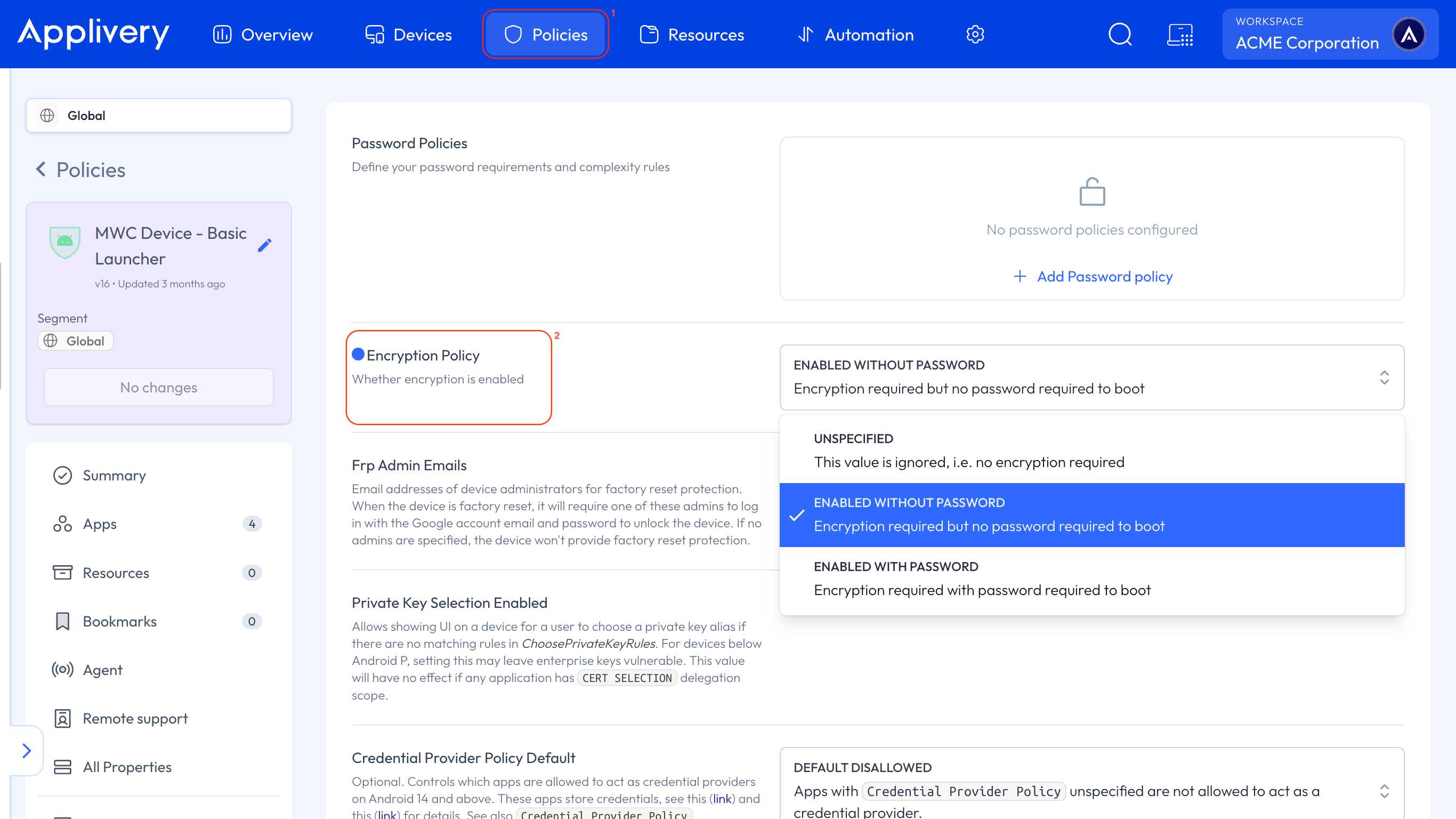
Once in the Applivery Dashboard, go to any of your Policies 1. From the left side menu, go to Security, and locate the Encryption Policy 2 setting.
Choosing the right value
Scenario | Recommended value |
|---|---|
Standard enterprise deployment |
|
Kiosk or unattended devices |
|
Regulated environment requiring pre-boot PIN |
|
Device was already in BFU and is unreachable | Recover physically, then consider switching to |
Security considerations
A common concern is whether ENABLED_WITHOUT_PASSWORD is less secure than ENABLED_WITH_PASSWORD. The answer depends on the threat model:
Against offline attacks (extracting the storage chip and reading it externally): both values provide equivalent protection through Android FBE. The DE key is derived from a hardware-bound key that cannot be extracted without the device.
Against an attacker with physical access to a running device:
ENABLED_WITH_PASSWORDadds a layer by preventing the device from booting unattended, but this must be weighed against the operational risk of devices becoming permanently unmanageable if the user forgets their PIN.
For most enterprise deployments, ENABLED_WITHOUT_PASSWORD strikes the right balance between security and operational control.