

The Overview tab of a Device gives you a curated summary — the things you check most often, presented for reading. The Details tab is the opposite: a direct window into the raw data Windows itself reports back over MDM, with no interpretation on top.
It's the tab you open when the summary isn't enough: when you need to confirm what was actually delivered to a Device, or why something isn't applying.
Most of what you'll see here maps directly to a named Windows Configuration Service Provider (CSP) — the standard building blocks Windows uses to report and configure settings over MDM. Where a category maps to one, this page links to Microsoft's own reference for it.
Finding your way around
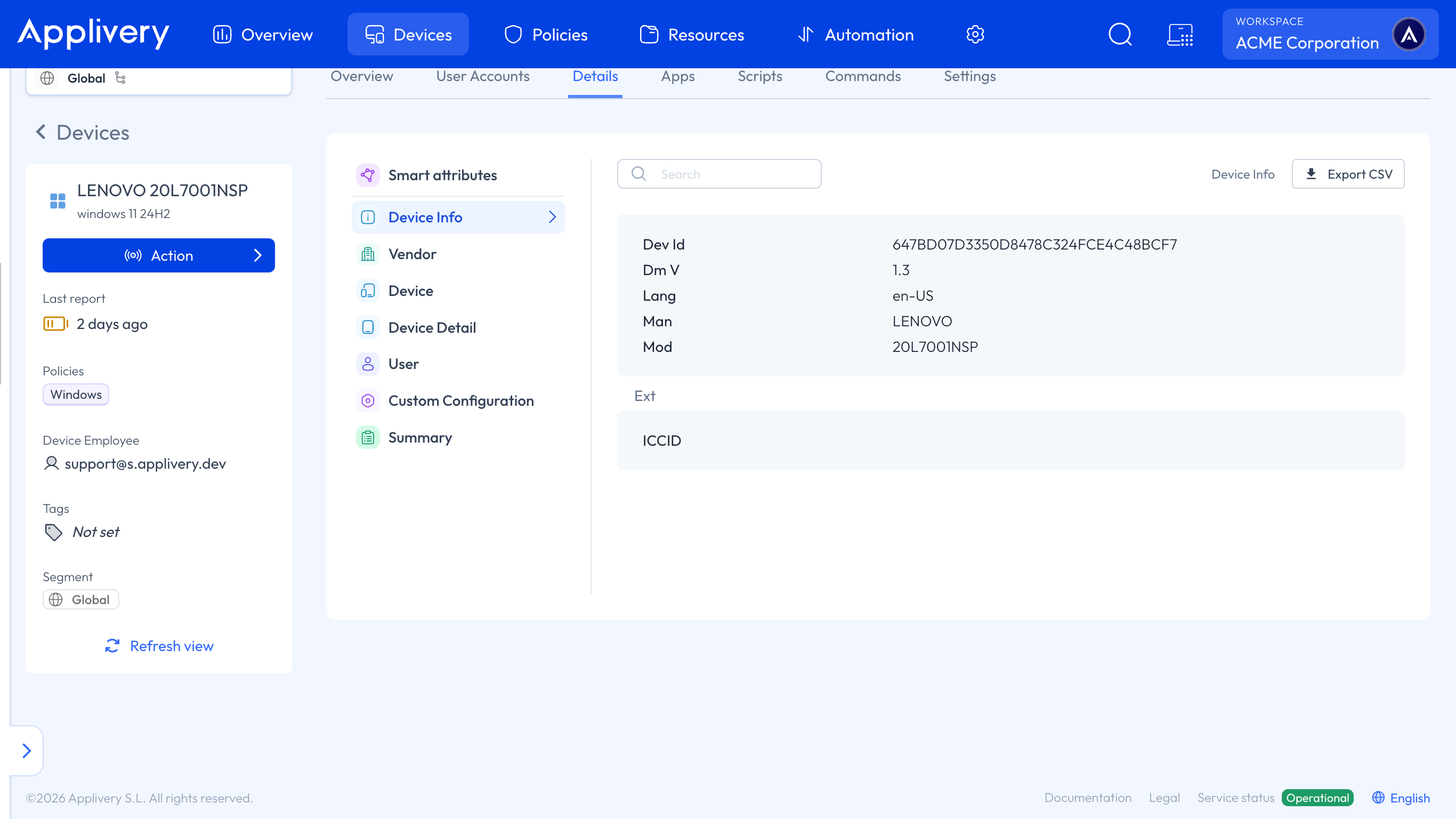
Open a Windows Device and go to its Details tab. A list of categories on the left filters what's shown on the right, and a search box at the top filters within the selected category. Export CSV, top right, downloads the data for whichever category you're currently looking at.
Everything here is read-only except Smart attributes. The rest is telemetry reported by the Device — you're reading what Windows sent, not configuring anything.
Smart attributes
The one category that isn't telemetry. This is where you view and manage the Device's Smart Attributes, scoped by Segment, with an Include from parents toggle and + Add smart attribute to create new ones.
Device Info
Baseline identity data about the Device and its MDM session: Dev Id (its unique MDM identifier), DmV (the DM protocol version it speaks), Lang, and vendor and model information.
This is the DevInfo CSP — the very first thing a Device reports when it talks to an MDM server.
Device
Settings and status that apply machine-wide. In Windows MDM terms this is the ./Device/Vendor/MSFT/... side of the CSP tree. Among others, it includes:
Enrollment and renewal health —
Error Code,Last Renewal Attempt Time,Renew Period,Retry Interval, the enrollmentServer URLandStatus, and theROOTcertificate hash confirming the trust chain to Applivery. From the DMClient CSP, which every enrolled Device uses to manage its connection to the server.Disk encryption — BitLocker status, Device Encryption Status and Removable Drives Encryption Status, from the BitLocker CSP.
Certificate stores — Root CA Trusted Certificates, Trusted People, Trusted Publisher and Untrusted Certificates, from the CertificateStore CSP.
App management — Enterprise Desktop App Management for classic Win32 and MSI installs, and Enterprise Modern App Management for Store and MSIX apps and their licenses, from the EnterpriseModernAppManagement CSP.
Language settings, and the result of any applied Custom ADMX Configuration.
This category also lists every policy area the Device supports. That's worth checking before you spend time troubleshooting why a setting isn't applying — if the area isn't in the list, the Device simply doesn't support it, and no amount of policy tuning will change that.
User
The same kind of data as Device, but scoped to the currently logged-in user — the ./User/Vendor/MSFT/... side of the tree. Many Windows CSPs exist in both a Device and a User instance, because some settings only make sense per person rather than machine-wide.
Personal Data Encryption — whether it's enabled and which known folders (Desktop, Documents and so on) are protected, from the Personal Data Encryption CSP.
Installed per-user apps — the AppX package family names installed for that user, such as Teams, Edge or Outlook.
User-scoped enrollment and certificates — ActiveSync, Accounts, and the user instance of Client Certificate Install for PFX and SCEP, from the ClientCertificateInstall CSP, plus the user-scoped DM Client provider information.
Vendor
Broader health, security and licensing telemetry that isn't split between Device and User — several CSPs reported under one category:
Security and health — antivirus signature status from the Defender CSP, battery estimates, cellular identities, encryption compliance and Device Guard.
Network security — firewall rules, profiles and dynamic keyword addresses, from the Firewall CSP.
Windows licensing — Device Licensing Service status, License Type, Edition, License Key Type and Subscriptions.
Miscellaneous device-wide settings — network settings such as credentials and password encryption, Secure Assessment, and Autopilot or device provisioning status.
Device Detail
Hardware and OS-level facts: software version (Sw V), OEM, DNS Computer Name and Device Name, Free Storage, Local Time and similar low-level attributes.
Mostly from the DevDetail CSP.
Custom Configuration
The actual configuration payloads pushed to the Device — including, for a Custom ADMX Configuration, the raw ADMX XML definition delivered to it, under Config Operations, ADMX Install and Policy.
This is the most direct way to confirm exactly what was sent to a Device, byte for byte. When a setting isn't behaving as expected, comparing what you configured against what actually arrived here usually settles the question.
Summary
A compliance-oriented rollup: Serial Number, Compliance and Is Compliance, Last Sync Error and Last Sync Error Message, and counts for Applications, Books and Profiles.
It's the fastest place to check whether a Device is currently in a healthy state — and Last Sync Error Message is often the single most useful field on the whole tab when something has stopped working.