

Every app you assign to a macOS Policy has an Update Policy. It lets you decide when new versions reach your Macs and when they stop being optional. You turn on Auto-updates, set how long a new build waits before it's offered (quarantine), and how long users have to install it before it's enforced (grace period).
Before you start
macOS Devices managed by Applivery.
An app assigned to a Policy. The app's install type (Force installed, Required for setup or Available) changes what happens when Auto-updates is off. You'll find the three types explained in Manage Apps.
Access to the Applivery Dashboard with permission to edit Policies.
The Update Policy options
Option | Range | What it does |
|---|---|---|
Auto-updates | On / Off | Turns automatic updates on for this app. Quarantine and grace only apply when it's on. |
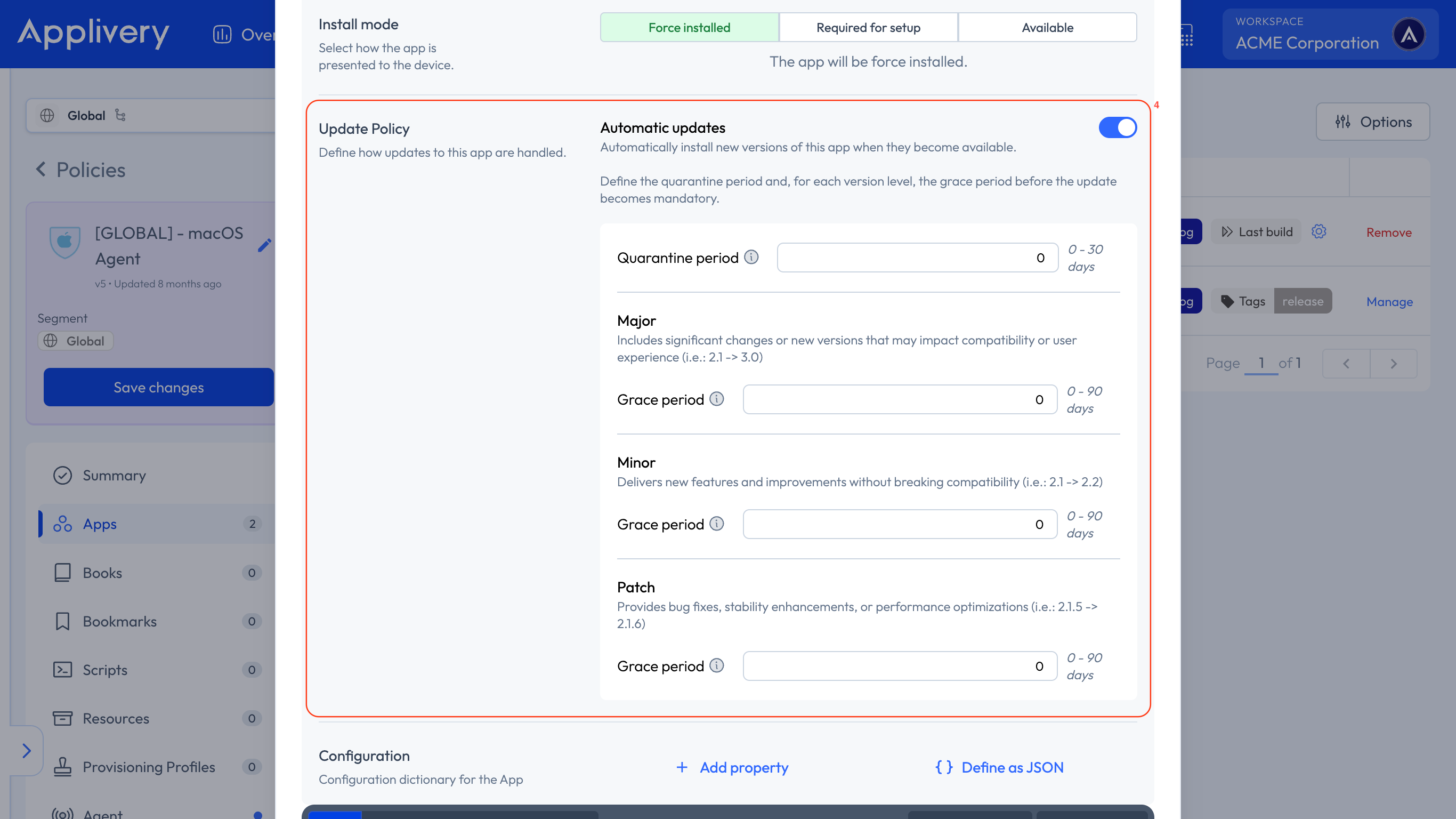
Quarantine | 0–30 days | Days a new build waits after its release before it's offered. One value for major, minor and patch updates. |
Grace period (major, minor, patch) | 0–90 days each | Days the update stays optional once quarantine ends. You set a separate value for each update type. With 0, there's no optional window. |
As soon as you set any grace period, Auto-updates must be on.
Configure the Update Policy
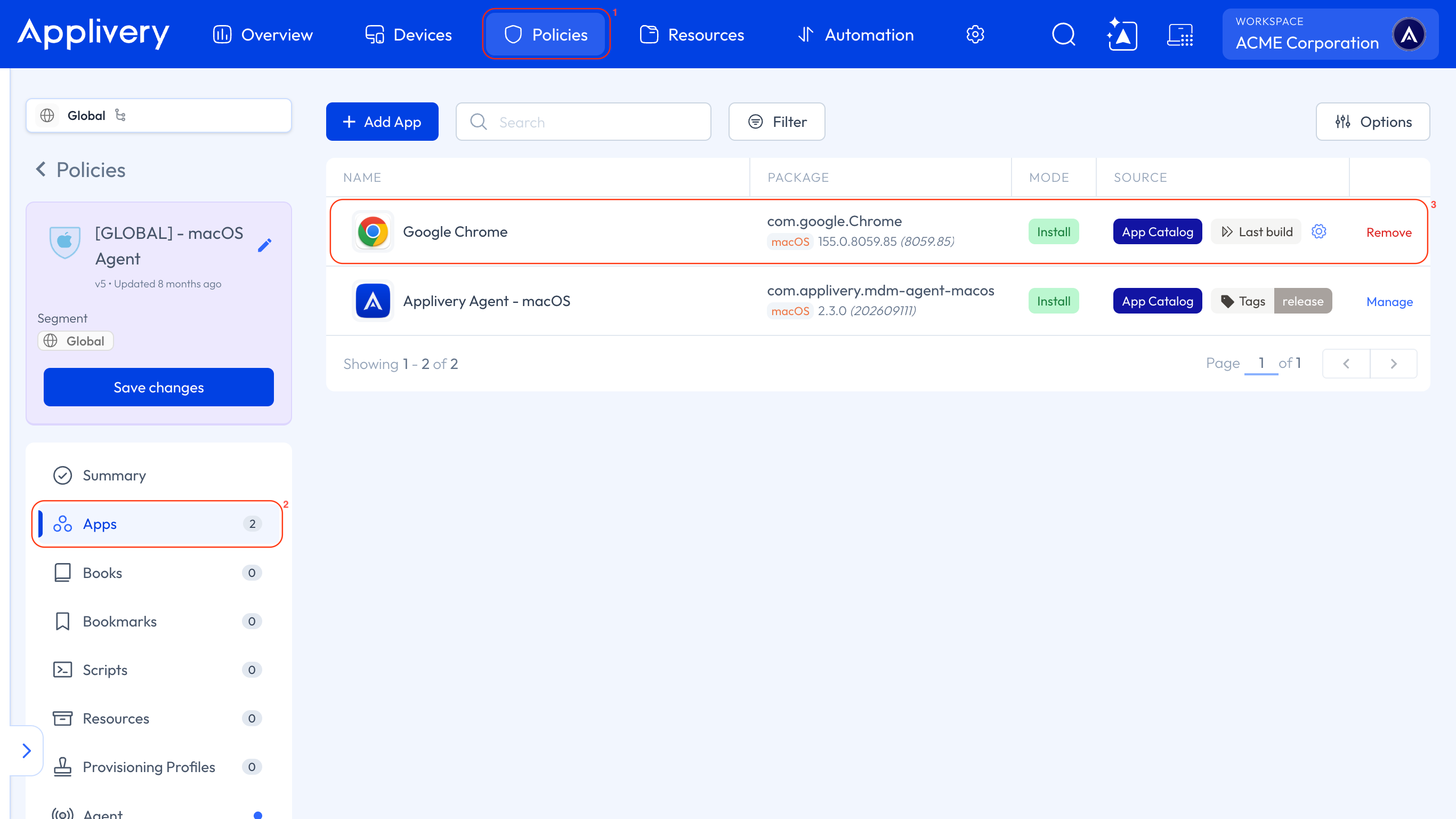
Once in the Applivery Dashboard, go to any of your Policies 1 or create a new one. Select the Apps 2 section from the left-hand menu, and add the app or open one that's already assigned 3.
Open Update Policy 4, turn on Auto-updates, and set the quarantine and the grace period for major, minor, and patch updates.
Save your changes.
How the deadline is calculated
Applivery calculates the deadline for each new build and sends it to the Applivery agent on the Mac:
Deadline = release date + quarantine + grace period for that update type
The grace period used depends on whether the new build is a major, minor or patch update.
The deadline is always counted from the build's release date. If the build reaches a Mac earlier for some reason, the deadline doesn't move.
What happens at each stage
Stage | What happens |
|---|---|
Quarantine | The new build isn't offered. Your Macs get the newest build that has already cleared quarantine. If no build has cleared it yet, the app isn't served. |
Grace period | The update is available, but installing it is optional until the deadline. |
After the deadline | The Applivery agent installs the update. If the app is open, it's closed first and then updated. |
Quarantine doesn't hold back installs sent with an Apple MDM command, installs during Setup Assistant, assignments pinned to a specific build or Policy Composition.
When Auto-updates is off
With Auto-updates off, there are no automatic updates after the first install. What that means depends on the install type:
Install type | Behavior |
|---|---|
Force installed | First version only. No later automatic updates. |
Required for setup | First version only. No later automatic updates. |
Available | Users install updates themselves from the Self-Service app. |
If you've never configured Auto-updates for an app, Applivery doesn't send any update policy and the Applivery agent keeps its default behavior. That isn't the same as turning Auto-updates off.
Example
Patch update with Auto-updates on. Quarantine is 3 days and the patch grace period is 7 days. A new build is released on Monday:
Monday to Wednesday: the build is in quarantine and isn't offered.
Thursday: quarantine ends and the grace period starts. Users can install the update whenever they want.
The following Thursday: the deadline passes and the Applivery agent installs the update on every Mac that's still on the previous version.
Force installed app with Auto-updates off. New builds aren't applied automatically. Your Macs stay on the first version installed until you change the assignment or turn Auto-updates on.