
A Service Account is a special type of Applivery account designed for non-human, machine-to-machine authentication. Unlike user accounts, which are tied to a person, a Service Account represents an automated system, integration, or pipeline that needs to interact with the Applivery API on its own behalf.
Service Accounts authenticate against the Workspace API (Organizations API) using a Bearer token. This gives them Workspace-level access to resources across all Apps and modules in your organization, making them the right credentials for cross-app automation and platform-level integrations.
Service Accounts vs. App API Tokens
Applivery has two distinct authentication mechanisms. Choosing the right one for your use case is important:
| Service Account | App API Token | |
|---|---|---|
| Scope | Workspace-wide — all Apps in the organization | Single app only |
| Used for | Workspace API (Organizations API) | Integrations API (per-app upload, Publications, Builds) |
| Typical use cases | Cross-app automation, BrowserStack App Live, Workspace-level scripts | CI/CD build uploads, per-app integrations |
| Token format | Bearer token | App Token string |
| Created in | Workspace Settings → Service Accounts | App Settings → API Tokens |
If you need to upload Builds from a CI/CD pipeline for a single app, use an App API Token. If you need to query or manage resources across multiple Apps, or connect a third-party platform like BrowserStack App Live, use a Service Account.
Roles and Permissions
When creating a Service Account, you assign it one of three roles. The role determines what operations the Service Account can perform across the Workspace:
| Role | Description |
|---|---|
| Admin | Full access to all Workspace resources and settings. Can create, modify, and delete any resource. |
| Developer | Read and write access to app resources (Builds, Publications, configurations). Cannot manage Workspace settings or other users. |
| Viewer | Read-only access to Workspace resources. Cannot create or modify any data. |
Follow the principle of least privilege: assign the most restrictive role that still allows the Service Account to perform its intended function.
Creating a Service Account
Service Accounts are managed from your Workspace Settings. Only users with Admin permissions can create or delete Service Accounts.
Once in the Applivery Dashboard, go to your Workspace Settings 1 from the top dropdown menu, then open Service Account 2 in the left-hand menu and click the + Create Service Account 3 button.
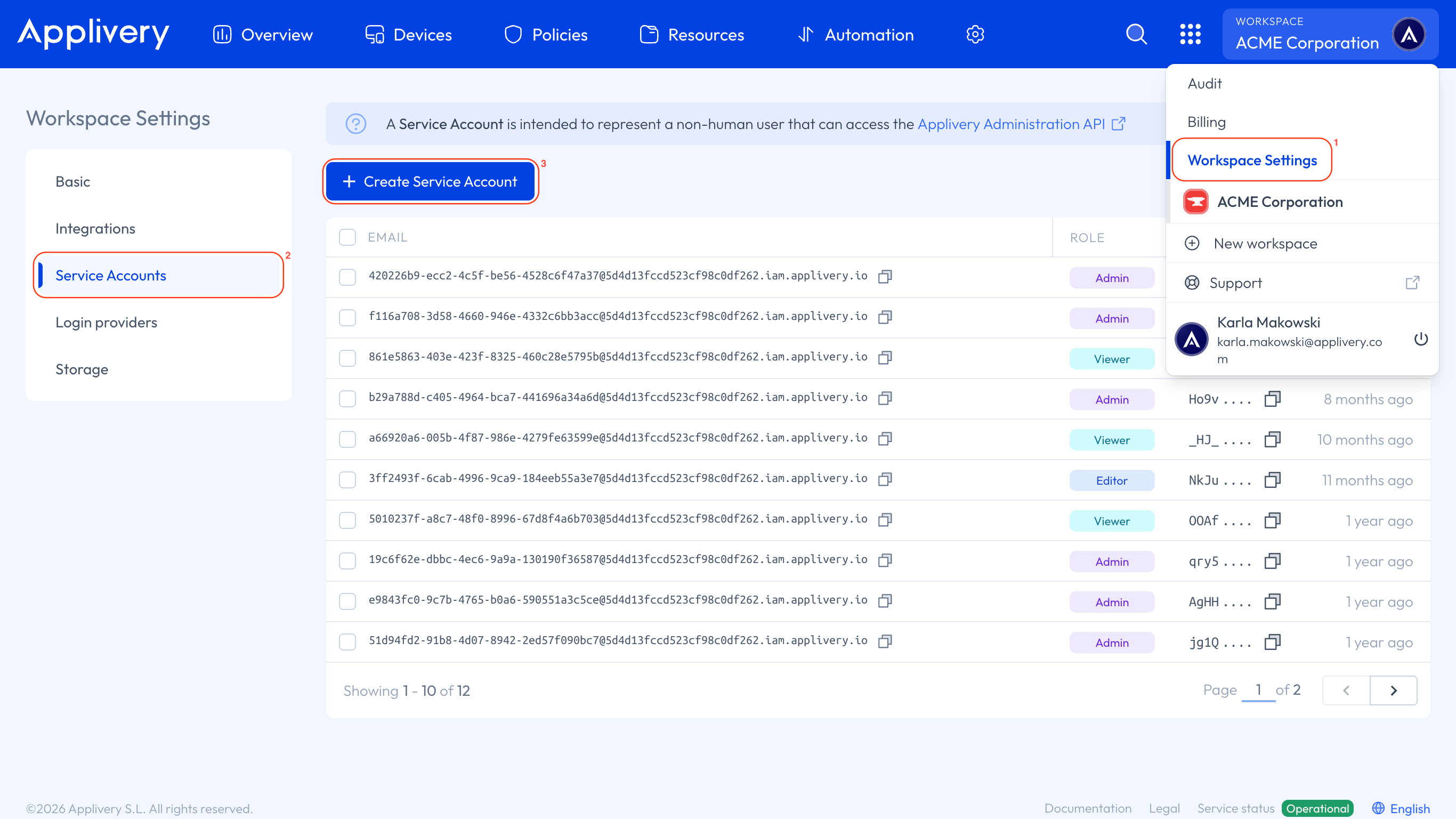
Enter a descriptive name for the account (e.g., ci-pipeline, browserstack-integration), and select a Role: Admin, Developer, or Viewer. Once you're doine click Create.
Don’t forget that you’ll also need to grant permissions to the Service Account depending on the segment where you want it to be used. You can read more about segment-based permission assignment at the following link.
The Service Account details will be displayed:
| Field | Description |
|---|---|
| Account | The Service Account identifier, in the format {service-account-id}@{organization-id}.iam.applivery.io |
| Bearer token | The authentication token used in API requests. |
Copy the Bearer token immediately. For security reasons, Applivery does not display the full token again after you leave this screen. If you lose the token, you will need to delete the Service Account and create a new one.
Using the Bearer token in API requests
Pass the Bearer token in the Authorization header of every Workspace API request:
curl 'https://api.applivery.io/v1/organizations/{organizationId}/...' \
  -H 'Authorization: Bearer YOUR_SERVICE_ACCOUNT_TOKEN'
Replace YOUR_SERVICE_ACCOUNT_TOKEN with the token copied during creation, and {organizationId} with your organization's identifier.
Storing the token securely
The Bearer token grants Workspace-level access. Treat it like a password:
Never commit it to source control. Store it as a secret in your CI/CD platform, secret manager, or environment variable.
One Service Account per integration. Create a separate Service Account for each external system (e.g., one for BrowserStack, one for a Workspace automation script). This limits the blast radius if a token is compromised and makes it easy to rotate without affecting other systems.
Rotate tokens periodically. Delete and recreate Service Accounts as part of your regular credential rotation policy.
CI/CD platforms — where to store the token:
| Platform | Where to store |
|---|---|
| GitHub Actions | Repository or organization Secret |
| Azure Pipelines | Pipeline Variable (secret) |
| Bitrise | Secret (Protected toggle enabled) |
| Jenkins | Jenkins Credential (Secret text) |
Managing existing Service Accounts
All Service Accounts in your Workspace are listed in the Service Accounts section under Workspace Settings. From this view, you can:
View the account identifier and role for each Service Account.
Delete a Service Account to immediately revoke its access. Any system using the deleted account's token will receive
401 Unauthorizederrors on subsequent requests.
There is no way to retrieve or regenerate a token for an existing Service Account. If a token needs to be replaced, delete the account and create a new one.
Where Service Accounts are required
The following Applivery features and integrations authenticate using a Service Account Bearer token:
| Feature | Reason |
|---|---|
| Workspace API (Organizations API) | All Workspace API endpoints require Service Account authentication. |
| BrowserStack App Live integration | App Live connects to your Applivery Workspace using a Service Account Bearer token. |
| Cross-app automation scripts | Any script that reads or writes data across multiple Apps needs Workspace-level access. |