

Integrate Applivery with external services using custom webhooks to receive real-time notifications about key App Distribution events.
Webhooks allow you to connect Applivery to any external service that accepts HTTP POST requests — CI/CD pipelines, custom dashboards, notification tools, and more. When a relevant event occurs in Applivery, a JSON payload is sent automatically to the URL you configure.
For App Distribution, the following events can trigger a webhook notification:
A new Build has been uploaded.
A new Build has been processed and is ready to install.
A new Feedback report has been received.
A new Bug report has been received.
An App enterprise certificate is about to expire.
Getting started
Webhook integrations can be configured at two levels:
Workspace — Notifications from all Apps within your organization are sent to the configured URL.
App — Notifications from a specific App only are sent to the configured URL.
Decide whether you want a Workspace-level or App-level integration. Once in the Applivery Dashboard:
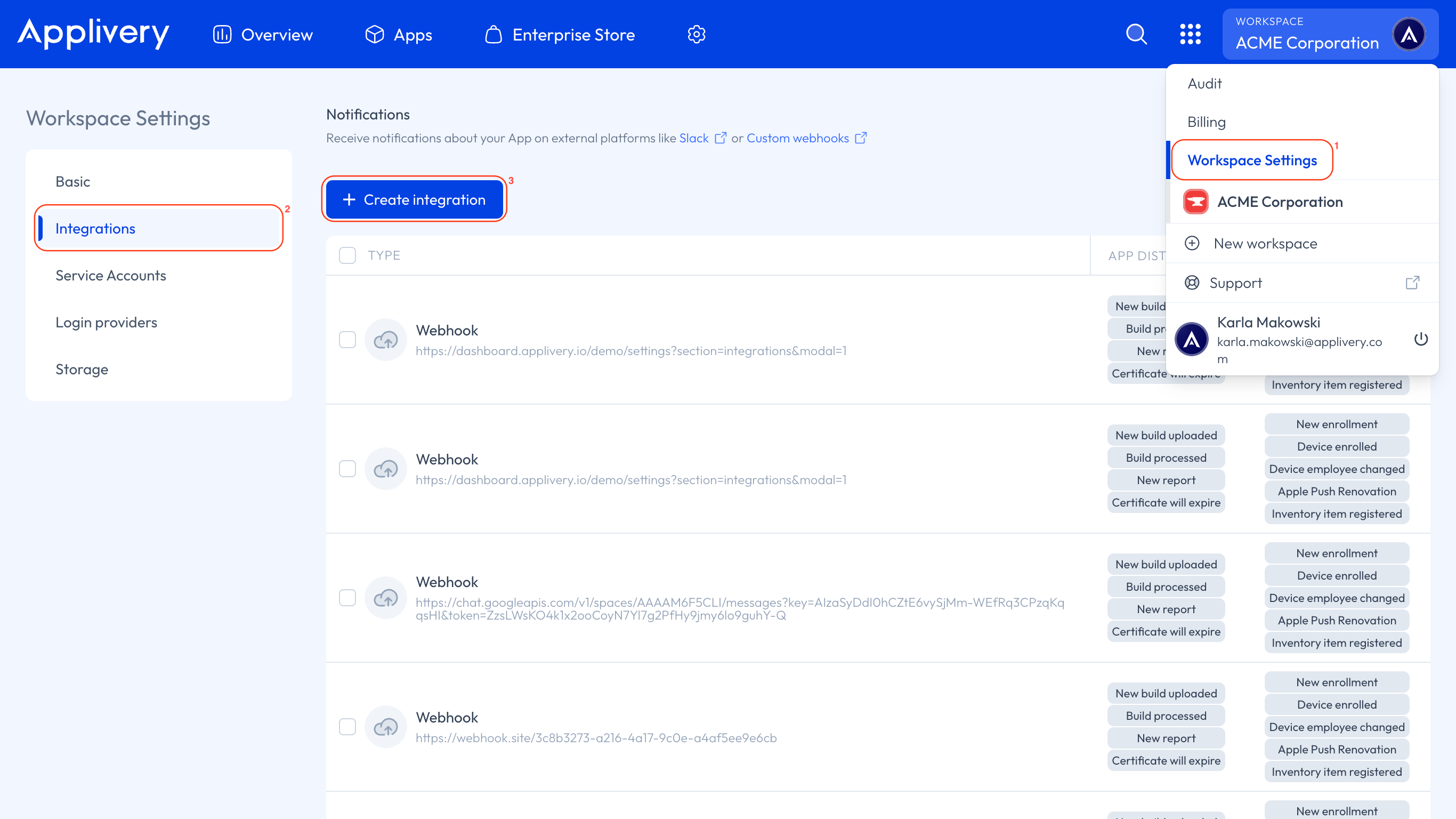
- For Workspace: Go to your Workspace Settings 1 from the top dropdown menu, then open Integrations 2 in the left-hand menu and click the + Create integration 3 button.
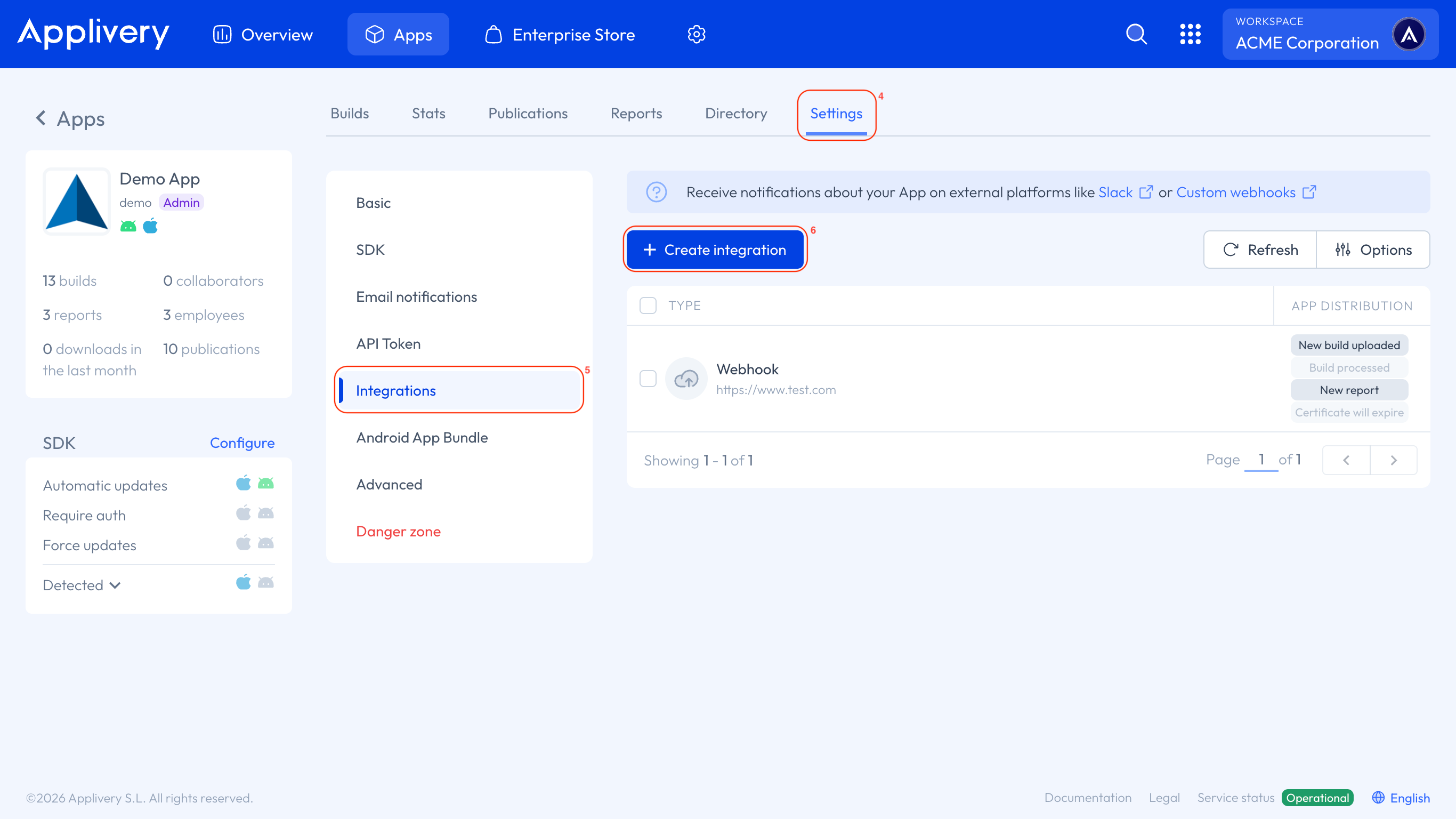
- For a specific App: Go to the App Settings 4 and, from the left-hand menu, select Integrations 5. Click the + Create integration 6 button.
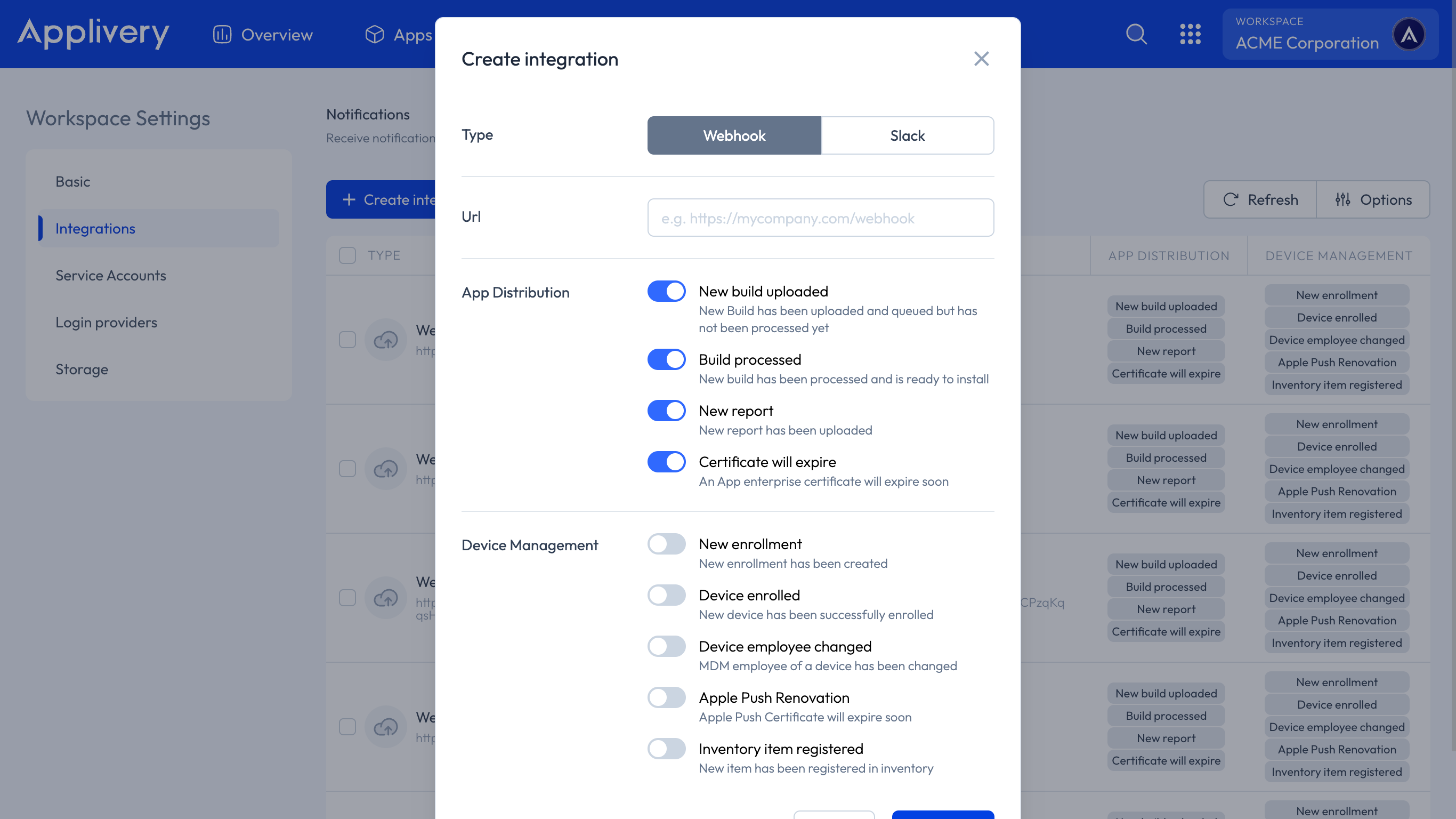
Select Webhook as the integration type.
Enter the URL that should receive the webhook payloads.
Select the events you want to subscribe to from the list.
Click Save.
Managing Webhook Integrations
After saving, you will be redirected to the Integrations section, where your new webhook is listed with a summary of its configuration:
Type: Webhook
Configuration: The destination URL
Events: The list of subscribed events
Editing a Webhook
Go to the Integrations section of your Organization or App and click on an existing webhook integration. A side panel will open where you can update the destination URL and the subscribed events.
Deleting a Webhook
Open the webhook integration from the Integrations section and click the Delete button in the side panel.
Event Payloads
All webhook notifications are delivered as HTTP POST requests with a JSON body. Use the action field to identify the event type and route your processing logic accordingly.
{
  "action": "build_created",
  "organization": {
    "id": "5d4d1391cd523c15f50df235",
    "name": "Applivery Test",
    "url": "https://dashboard.applivery.io/test"
  },
  "application": {
    "id": "5e790ce04faa50cac52e4676",
    "name": "Awesome App",
    "url": "https://dashboard.applivery.io/test/apps/awesome-app"
  },
  "build": {
    "id": "5e79232e98d88ac68cf7d4bc",
    "url": "https://dashboard.applivery.io/test/apps/awesome-app/builds?id=5e79232e98d88ac68cf7d4bc"
  }
}
{
  "action": "build_processed",
  "organization": {
    "id": "5d4d1391cd523c15f50df235",
    "name": "Applivery Test",
    "url": "https://dashboard.applivery.io/test"
  },
  "application": {
    "id": "5e790ce04faa50cac52e4676",
    "name": "Awesome App",
    "url": "https://dashboard.applivery.io/test/apps/awesome-app"
  },
  "build": {
    "id": "5e79232e98d88ac68cf7d4bc",
    "os": "android",
    "versionName": "",
    "url": "https://dashboard.applivery.io/test/apps/awesome-app/builds?id=5e79232e98d88ac68cf7d4bc"
  }
}
{
  "action": "bug_created",
  "organization": {
    "id": "5c9921fbb9f3bb001cc5c9a9",
    "name": "Applivery Dev",
    "url": "https://dashboard.applivery.io/test"
  },
  "application": {
    "id": "5cd19870cdecf8001bef50b7",
    "name": "Awesome App",
    "url": "https://dashboard.applivery.io/test/apps/awesome-app"
  },
  "report": {
    "message": "This is a Bug message that will be included in the Report along with the technical information of the device",
    "url": "https://dashboard.applivery.io/test/apps/awesome-app/reports?id=5e7923a976b4b0e9aa4aa6a9"
  }
}
{
  "action": "feedback_created",
  "organization": {
    "id": "5c9921fbb9f3bb001cc5c9a9",
    "name": "Applivery Dev",
    "url": "https://dashboard.applivery.io/test"
  },
  "application": {
    "id": "5cd19870cdecf8001bef50b7",
    "name": "Awesome App",
    "url": "https://dashboard.applivery.io/test/apps/awesome-app"
  },
  "report": {
    "message": "This is a Feedback message that will be included in the Report along with the technical information of the device",
    "url": "https://dashboard.applivery.io/test/apps/awesome-app/reports?id=5e7923a976b4b0e9aa4aa6a9"
  }
}
{
  "action": "certificate_application_will_expire",
  "organization": {
    "id": "5c9921fbb9f3bb001cc5c9a9",
    "name": "Applivery Dev",
    "url": "https://dashboard.applivery.io/test"
  },
  "application": {
    "id": "5cd19870cdecf8001bef50b7",
    "name": "Awesome App",
    "url": "https://dashboard.applivery.io/test/apps/awesome-app"
  },
  "numDays": "5",
  "team": {
    "name": "Applivery Test",
    "identifier": "BJ55L1KAQW"
  }
}
The numDays field indicates how many days remain before the certificate expires.
Event Reference
| Action | Trigger |
|---|---|
build_created |
A new Build has been uploaded and is queued for processing. |
build_processed |
A Build has been processed and is ready to install. |
bug_created |
A new Bug Report has been submitted. |
feedback_created |
A new Feedback Report has been submitted. |
certificate_will_expire |
An App enterprise certificate is about to expire. |