
Android App Bundle (AAB)
The Android App Bundle (AAB) is Android's official publishing format, designed to make App delivery more efficient and flexible. Instead of generating a single APK that works for all Devices, an AAB contains all your App's compiled code and resources and defers APK generation and signing to the distribution platform — resulting in smaller, more optimised installs for end users.
Switching to AAB does not require refactoring your code. The format also unlocks modular app development and customisable feature delivery, making it easier to scale and maintain your App over time.

How Applivery handles AAB files
Google Play uses an App bundle to generate and serve optimised APKs tailored to each Device's specific hardware configuration, so users only download the code and resources their Device actually needs.
Applivery's distribution model works differently. Because users typically download Apps through a browser (Safari, Chrome, Firefox, etc.), Applivery does not have reliable access to the Device's hardware configuration at download time, which is a prerequisite for generating a Device-specific optimised APK.
To work around this, Applivery uses Android's official bundletool to extract a Universal APK from your App bundle. A Universal APK includes all the code and resources needed to install the App on any supported Android device, regardless of hardware. This means the App will install correctly on all your supported Devices, but the download will be larger than a Device-optimised APK generated by Google Play.
Current limitations
As a result of this approach, some Android App Bundle features are not yet fully supported in Applivery:
- Dynamic Delivery: Feature-based delivery and smaller device-specific APK sizes are not available, since they require hardware detection at download time.
What we are working on
Our team is actively working on two approaches to bring full AAB support to Applivery:
Device prediction: To enable Dynamic Delivery from Applivery App Stores without requiring explicit hardware detection.
SDK-level hardware detection: To obtain device hardware information through the Applivery SDK and enable Dynamic Delivery for in-app updates.
You can follow the progress of both initiatives on our public roadmap on GitHub.
Configuring Android App Bundle in Applivery
To upload and process AAB files, you first need to provide your App's signing configuration so Applivery can generate a valid Universal APK from your bundle.
Go to Settings > Android App Bundle within the App you want to configure, and provide the following required information:
| Field | Description |
|---|---|
| Keystore | The deployment keystore (.jks file) used to sign the generated APKs. |
| Keystore password | The keystore's password. Can be entered as plain text or provided via a .pwd file. |
| Keystore alias | The alias of the signing key to use within the keystore. |
| Key password | The password for the signing key. Can be entered as plain text or provided via a .pwd file. |
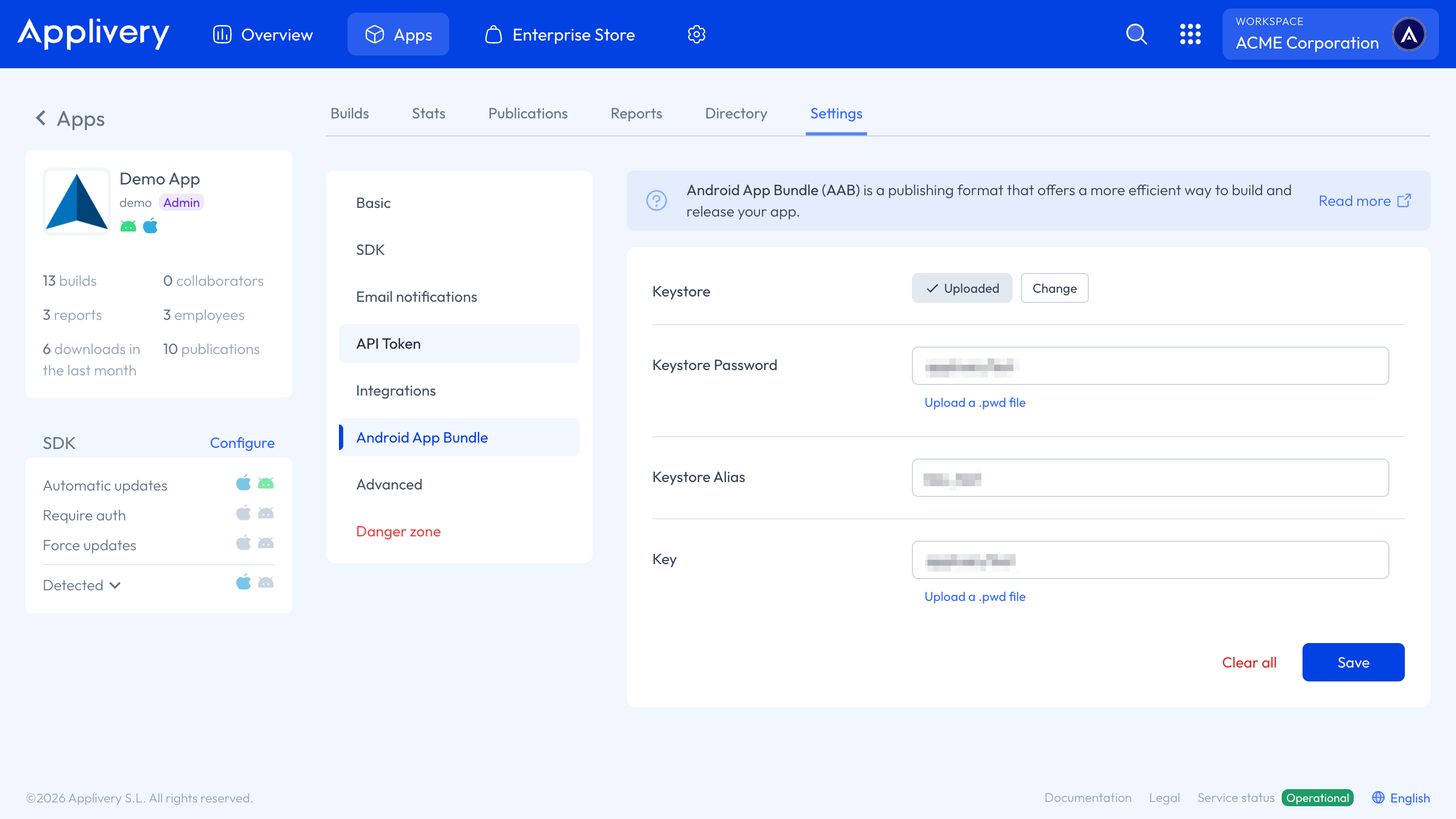
This configuration must be in place before uploading any .aab file. Uploads will fail processing if the keystore configuration is missing or incorrect. See Build Processing Codes for error details.
Once your keystore is configured, you can upload your .aab file using any of the following methods:
Dashboard: Go to the Builds section of your App and select or drag and drop your
.aabfile.Upload API: Use the same upload method as standard APKs. See the Upload API documentation for details.
CI/CD integrations: Use any of Applivery's existing integrations with popular CI/CD platforms such as Fastlane, Jenkins, Bitrise, or Azure DevOps.
Once uploaded, Applivery will automatically process the bundle, extract the Universal APK using bundletool, sign it with your keystore configuration, and make it available for distribution.