

Integrate Applivery with external services using custom webhooks to receive real-time notifications about key Device Management events.
Webhooks allow you to connect Applivery to any external service that accepts HTTP POST requests — ITSM platforms, custom dashboards, automation tools, and more. When a relevant event occurs in Applivery, a JSON payload is sent automatically to the URL you configure.
For Device Management, the following events can trigger a webhook notification:
A new Enrollment Token has been created.
A new Device has been successfully enrolled.
A Device Employee has been assigned to or changed on a Device.
The Apple Push Certificate is about to expire.
A new Inventory item has been registered.
Getting started
Webhook integrations can be configured at the Workspace level, so notifications from all Devices and enrollment activity within your organization are sent to the configured URL.
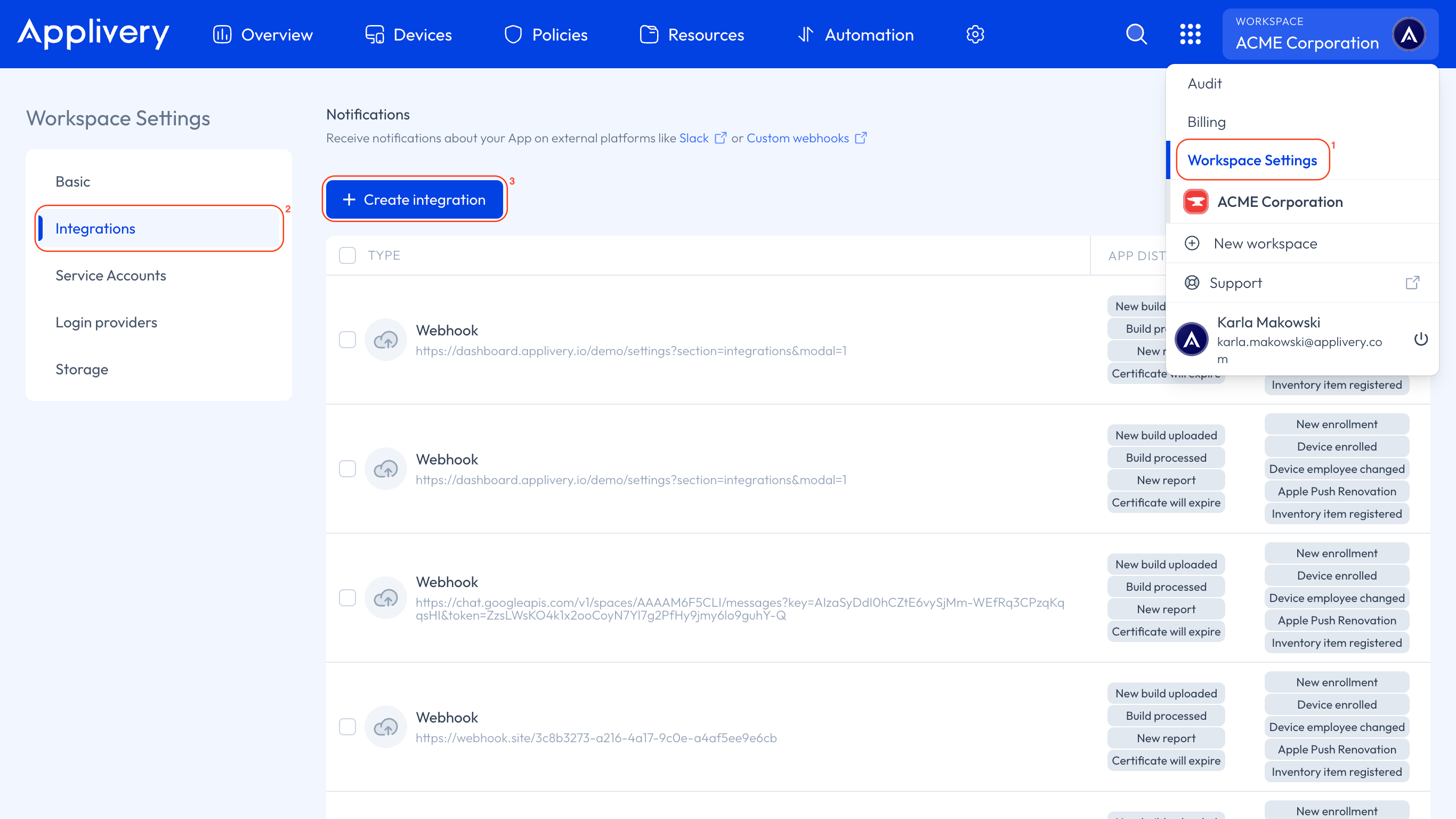
Once in the Applivery Dashboard, go to your Workspace Settings (1) from the top dropdown menu, then open Integrations (2) in the left-hand menu and click the + Create integration (3) button.
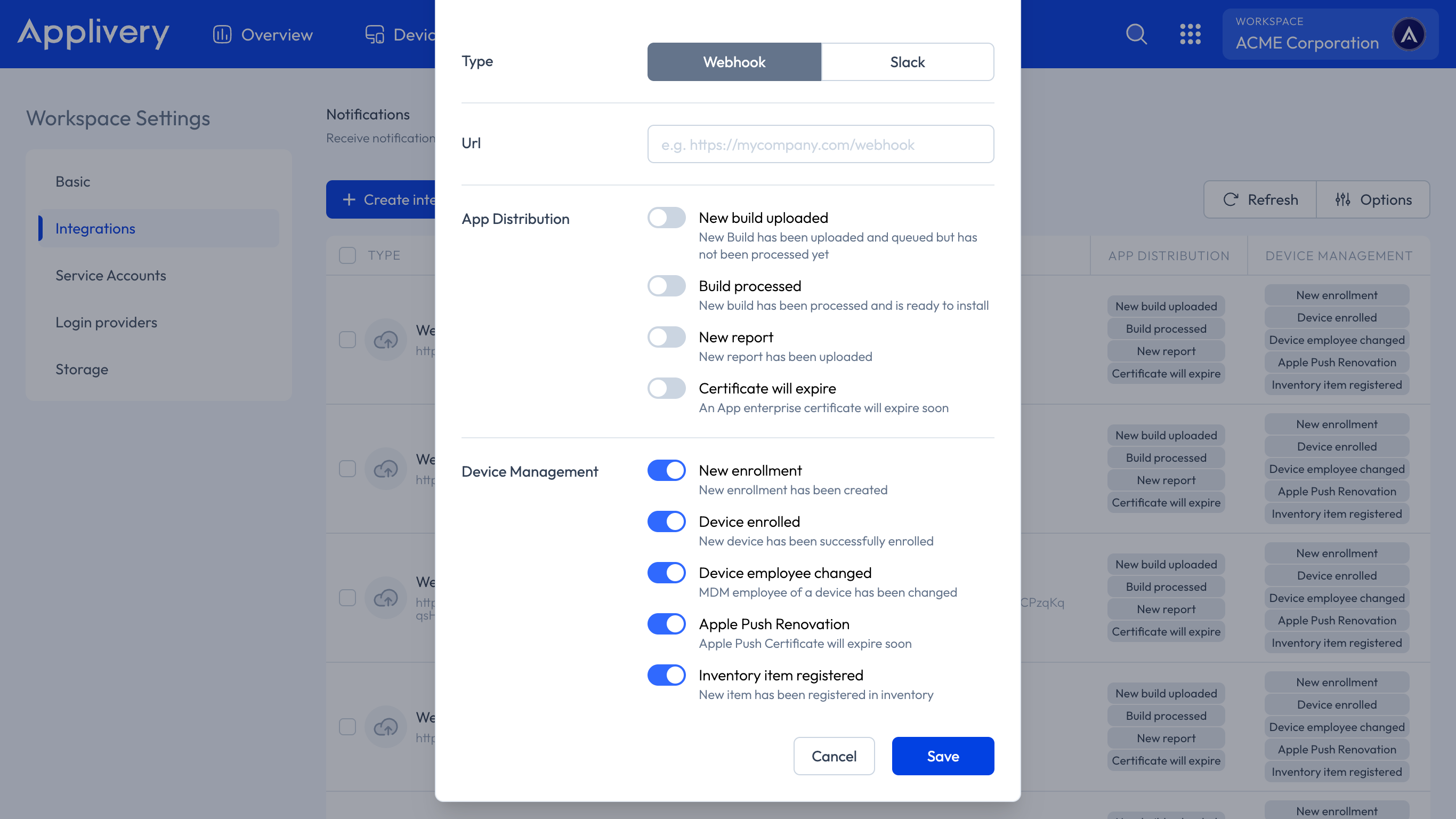
Select Webhook as the integration type.
Enter the URL that should receive the webhook payloads.
Select the events you want to subscribe to from the list.
Click Save.
Managing Webhook Integrations
After saving, you will be redirected to the Integrations section, where your new webhook is listed with a summary of its configuration:
Type: Webhook.
Configuration: The destination URL.
Events: The list of subscribed events.
Editing a Webhook
Just click on an existing webhook integration. A side panel will open where you can update the destination URL and the subscribed events.
Deleting a Webhook
Open the webhook integration and click the Delete button in the side panel.
Event Payloads
All webhook notifications are delivered as HTTP POST requests with a JSON body. Use the action field to identify the event type and route your processing logic accordingly.
The {os} prefix in some action names is replaced at runtime by the platform identifier — for example emm for Android or win for Windows.
{
  "action": "emm_enrollment_token_created",
  "sendEmail": true,
  "enrollmentToken": {
    "type": "Fully Managed"
  },
  "mdmUser": {
    "id": {
      "id": "5e9099ee4da32b180204770e",
      "email": "[email protected]"
    },
    "email": "[email protected]",
    "url": "https://dashboard.applivery.io/test/mdm/users/5e9099ee4da32r180204770e"
  },
  "organization": {
    "id": "5d4d1391cd523c15f50df235",
    "name": "Applivery Test",
    "url": "https://dashboard.applivery.io/test"
  }
}
The enrollmentToken.type field indicates the management mode — for example, Fully Managed or Work Profile.
{
  "action": "emm_device_enrolled",
  "organization": {
    "id": "5d4d1391cd523c15f50df235",
    "name": "Applivery Test",
    "url": "https://dashboard.applivery.io/test"
  },
  "emmDevice": {
    "type": "Fully Managed",
    "url": "https://dashboard.applivery.io/test/mdm/users/5e9099ee4da32b180204770e?id=5f634c11034824062256e38c"
  },
  "mdmUser": {
    "id": "5e9099ee4da32b180204770e",
    "email": "[email protected]",
    "url": "https://dashboard.applivery.io/test/mdm/users/5e9099ee4da32b180204770e"
  }
}
{
  "action": "win_device_added_mdm_user",
  "organization": {
    "id": "5c34ec7810399b6cc062a04a",
    "name": "Applivery Test",
    "url": "https://dashboard.applivery.io/test"
  },
  "winDevice": {
    "productName": "",
    "url": "https://dashboard.applivery.io/test/mdm/users/65f83a5e4ecbfd693b7486d6?id=66d05845114a9509d18e7266"
  },
  "mdmUser": {
    "id": "65f83a5e4ecbfd693b7486d6",
    "email": "[email protected]",
    "url": "https://dashboard.applivery.io/test/mdm/users/65f83a5e4ecbfd693b7486d6"
  },
  "trigger": "deviceUpdate"
}
The trigger field indicates what caused the user assignment — for example, deviceUpdate.
{
  "action": "apple_push_certification_renovation",
  "organization": {
    "id": "5d4d1391cd523c15f50df235",
    "name": "Applivery Test",
    "url": "https://dashboard.applivery.io/test"
  },
  "numDays": "5",
  "appleId": "[email protected]"
}
The numDays field indicates how many days remain before the certificate expires. The appleId field identifies the Apple ID used to create the certificate.
{
  "action": "A new InventoryItem is being registered",
  "subAction": "created",
  "organization": {
    "id": "5d4d1391cd523c15f50df235",
    "name": "Applivery Test",
    "url": "https://dashboard.applivery.io/test"
  },
  "inventoryItem": {
    "id": "62bd71d980df8b001b085ceb",
    "type": "monitor",
    "members": {
      "type": "mdmUser",
      "memberId": "6241d3d804e388001b3c605c",
      "email": "[email protected]"
    },
    "metadata": {}
  }
}
Use the subAction field to determine the specific operation performed on the inventory item — for example, created, updated, or deleted.
Event Reference
| Action | Trigger |
|---|---|
{os}_enrollment-token_created |
A new MDM Enrollment token has been created. |
{os}_device_enrolled |
A Device has been successfully enrolled. |
{os}_device_added_mdm_user |
An MDM user has been assigned to or changed on a Device. |
apple_push_certification_renovation |
The Apple Push Certificate is approaching expiration. |
A new InventoryItem {action} |
An item has been registered or updated in Inventory. |