

Azure DevOps is a Microsoft platform that covers the full application lifecycle — version control, project management, automated Builds, testing, and release management. Azure Pipelines, part of the Azure DevOps suite, provides cloud-hosted CI/CD pipelines for Linux, macOS, and Windows, supporting web, desktop, and mobile applications.
The Applivery integration with Azure Pipelines lets you automatically upload new Builds to Applivery at the end of each pipeline run, making them immediately available to QA teams, stakeholders, or internal users.
There are two approaches to integrating Azure Pipelines with Applivery:
- Via Fastlane (recommended for iOS and Android projects that already use Fastlane) — delegates the upload to the Applivery Fastlane plugin.
- Via the Applivery Upload API directly (recommended for any project or when Fastlane is not in use) — calls the API with a
curlstep in your YAML pipeline.
Prerequisites
Before setting up either approach, make sure you have:
- An Azure DevOps account with an Azure Pipelines configuration in place.
- An Applivery App API Token. Find it in App Settings → API Tokens in the Applivery dashboard, or see Apps API Authentication.
- A pipeline that produces a Build artifact (
.ipa,.apk,.aab, or another supported format).
Never hardcode your Applivery token directly in azure-pipelines.yml. Store it as a secret pipeline variable in Azure DevOps so it is masked in logs and not committed to your repository.
- Open your Azure DevOps project and go to Pipelines → your pipeline → Edit.
- Click Variables (top right).
- Add a new variable named
APPLIVERY_TOKEN. - Paste your Applivery App API Token as the value.
- Enable the Keep this value secret toggle to mask it in logs.
- Save.
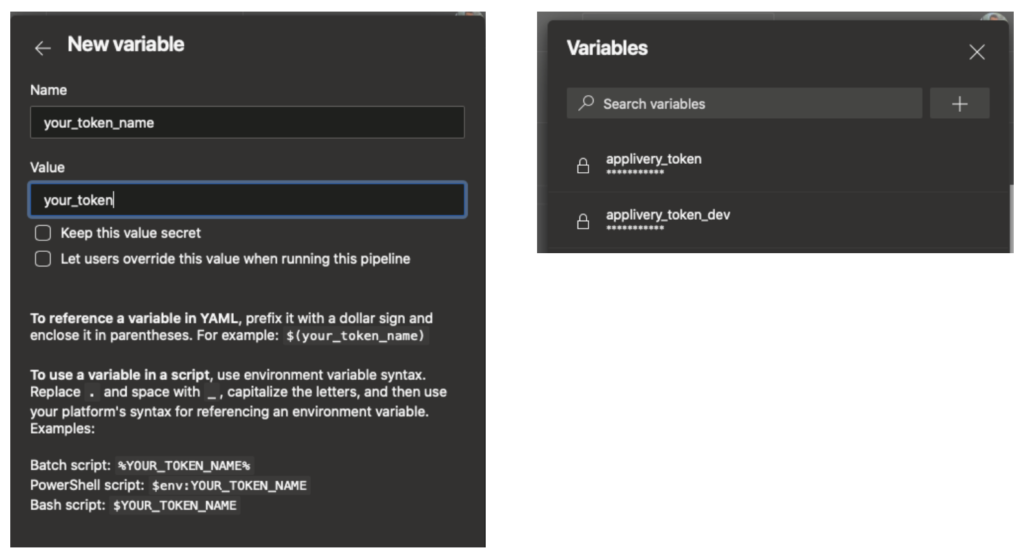
Once defined, reference it in your pipeline YAML as $(APPLIVERY_TOKEN).
This is the recommended approach if your project already uses Fastlane for building and signing. The Applivery Fastlane plugin handles the upload and all metadata automatically.
For full Fastlane plugin documentation, see Fastlane Integration.
Pipeline YAML
In your azure-pipelines.yml, add a script step that invokes your Fastlane lane and passes the token as a parameter:
- script: fastlane dev_deploy applivery_token:$(APPLIVERY_TOKEN)
  displayName: 'Deploy to Applivery via Fastlane'
  env:
    APPLIVERY_TOKEN: $(APPLIVERY_TOKEN)
Fastfile
Define a lane in your Fastfile that Builds and uploads to Applivery. The example below uses last_git_commit[:message] as the changelog and number_of_commits to auto-increment the Build number:
desc "Build and deploy to Applivery"
lane :dev_deploy do |options|
  increment_build_number(
    build_number: number_of_commits
  )

  build_app(
    scheme: "MyApp-Dev",
    export_method: "enterprise"
  )

  applivery(
    app_token: options[:applivery_token],
    notify_collaborators: true,
    changelog: last_git_commit[:message]
  )
end
You can extend the applivery action with additional options like tags, notify_message, and notify_language. See the Fastlane Integration documentation for all available parameters.
If you are not using Fastlane, or want a simpler setup with no additional tooling, call the Applivery Upload API directly from your pipeline using curl. This works for any platform and any pipeline agent.
Pipeline YAML — iOS example
trigger:
  - main

pool:
  vmImage: 'macos-latest'

stages:
  - stage: Build
    jobs:
      - job: BuildAndUpload
        steps:
          - checkout: self

          - task: Xcode@5
            displayName: 'Build iOS app'
            inputs:
              actions: 'build'
              scheme: 'MyApp'
              sdk: 'iphoneos'
              configuration: 'Release'
              xcWorkspacePath: 'MyApp.xcworkspace'
              packageApp: true
              signingOption: 'default'

          - script: |
              curl 'https://upload.applivery.io/v1/integrations/builds' \
                --retry 5 \
                --fail \
                -H "Authorization: Bearer $(APPLIVERY_TOKEN)" \
                -F "build=@$(Build.ArtifactStagingDirectory)/MyApp.ipa" \
                -F "versionName=$(Build.BuildNumber)" \
                -F "changelog=$(Build.SourceVersionMessage)" \
                -F "tags=azure-pipelines, ios" \
                -F "notifyCollaborators=true" \
                -F "notifyMessage=New build available from Azure Pipelines" \
                -F "notifyLanguage=en" \
                -F "deployer.name=Azure Pipelines" \
                -F "deployer.info.commit=$(Build.SourceVersion)" \
                -F "deployer.info.branch=$(Build.SourceBranchName)" \
                -F "deployer.info.commitMessage=$(Build.SourceVersionMessage)" \
                -F "deployer.info.buildUrl=$(System.TeamFoundationCollectionUri)$(System.TeamProject)/_build/results?buildId=$(Build.BuildId)" \
                -F "deployer.info.buildNumber=$(Build.BuildNumber)" \
                -F "deployer.info.repositoryUrl=$(Build.Repository.Uri)"
            displayName: 'Upload to Applivery'
            env:
              APPLIVERY_TOKEN: $(APPLIVERY_TOKEN)
Pipeline YAML — Android example
trigger:
  - main

pool:
  vmImage: 'ubuntu-latest'

stages:
  - stage: Build
    jobs:
      - job: BuildAndUpload
        steps:
          - checkout: self

          - task: Gradle@3
            displayName: 'Build Android APK'
            inputs:
              workingDirectory: ''
              gradleWrapperFile: 'gradlew'
              gradleOptions: '-Xmx3072m'
              tasks: 'assembleRelease'

          - script: |
              curl 'https://upload.applivery.io/v1/integrations/builds' \
                --retry 5 \
                --fail \
                -H "Authorization: Bearer $(APPLIVERY_TOKEN)" \
                -F "build=@$(Build.ArtifactStagingDirectory)/app-release.apk" \
                -F "versionName=$(Build.BuildNumber)" \
                -F "changelog=$(Build.SourceVersionMessage)" \
                -F "tags=azure-pipelines, android" \
                -F "notifyCollaborators=true" \
                -F "notifyMessage=New Android build from Azure Pipelines" \
                -F "notifyLanguage=en" \
                -F "deployer.name=Azure Pipelines" \
                -F "deployer.info.commit=$(Build.SourceVersion)" \
                -F "deployer.info.branch=$(Build.SourceBranchName)" \
                -F "deployer.info.commitMessage=$(Build.SourceVersionMessage)" \
                -F "deployer.info.buildUrl=$(System.TeamFoundationCollectionUri)$(System.TeamProject)/_build/results?buildId=$(Build.BuildId)" \
                -F "deployer.info.buildNumber=$(Build.BuildNumber)" \
                -F "deployer.info.repositoryUrl=$(Build.Repository.Uri)"
            displayName: 'Upload to Applivery'
            env:
              APPLIVERY_TOKEN: $(APPLIVERY_TOKEN)
Azure Pipelines predefined variables
The pipeline examples above use Azure Pipelines predefined variables, which are automatically available in every pipeline without additional configuration:
| Variable | Description |
|---|---|
Build.BuildNumber |
The Build number. Useful as a versionName in Applivery. |
Build.BuildId |
Unique numeric ID for the Build run. Used to construct the Build URL. |
Build.SourceVersion |
The full Git commit SHA that triggered the Build. |
Build.SourceBranchName |
The name of the triggering branch. E.g. main, develop. |
Build.SourceVersionMessage |
The commit message of the triggering commit. Useful as changelog. |
Build.Repository.Uri |
The URL of the source repository. |
Build.ArtifactStagingDirectory |
The local directory where build artifacts are placed. |
System.TeamFoundationCollectionUri |
The base URL of your Azure DevOps organization. |
System.TeamProject |
The name of the Azure DevOps project. |
For the full list of predefined variables, see the Azure Pipelines predefined variables documentation.
Key upload parameters reference
The curl form data fields map directly to the Applivery Upload API. These are the most commonly used:
| Parameter | Description |
|---|---|
build |
The binary file to upload. |
versionName |
Human-readable label for the Build. Using $(Build.BuildNumber) links it to the Azure run. |
changelog |
Release notes shown in the dashboard and notification emails. |
tags |
Comma-separated tags for filtering Builds. |
notifyCollaborators |
Set to true to email app Collaborators on upload. |
notifyMessage |
Custom message included in the notification email. |
deployer.name |
CI platform name shown in the Applivery dashboard. |
deployer.info.commit |
Git commit SHA. |
deployer.info.branch |
Git branch name. |
deployer.info.buildNumber |
Pipeline build number. |
deployer.info.buildUrl |
Direct URL to the Azure pipeline run. |
For the full parameter reference, see POST – Upload a Build.