

Cortex XDR de Palo Alto Networks es una plataforma avanzada de protección de endpoints que integra capacidades de detección, prevención y respuesta. Instalar Cortex XDR en dispositivos macOS a través de tu solución MDM permite un despliegue centralizado y garantiza que todos los endpoints estén protegidos sin necesidad de instalación manual.
Requisitos
Antes de desplegar Cortex XDR en dispositivos macOS a través de Applivery, asegúrate de tener lo siguiente:
Paquete cliente de Cortex XDR (
.pkg).ID de distribución y dirección Cloud ELB (desde tu panel de Cortex XDR).
Script de activación (para la licencia del agente).
Política de acceso completo al disco (mediante perfil de configuración).
Perfil
.mobileconfigpersonalizado de Cortex XDR.1 licencia de Applivery para Distribución de Apps.
Para desplegar Cortex XDR usando Applivery, deberás cargar el paquete de app comprimido (.zip) a tu sección de Gestión de Apps y configurarlo con un script de activación previo a la instalación.
Primero, descarga el instalador .pkg de Cortex XDR desde tu panel de Cortex XDR y asegúrate de copiar tu ID de distribución y dirección Cloud ELB, ya que los necesitarás más adelante para el script de activación.
Una vez descargado, comprime el archivo .pkg haciendo clic derecho sobre él y seleccionando Comprimir, lo que generará un archivo .zip.
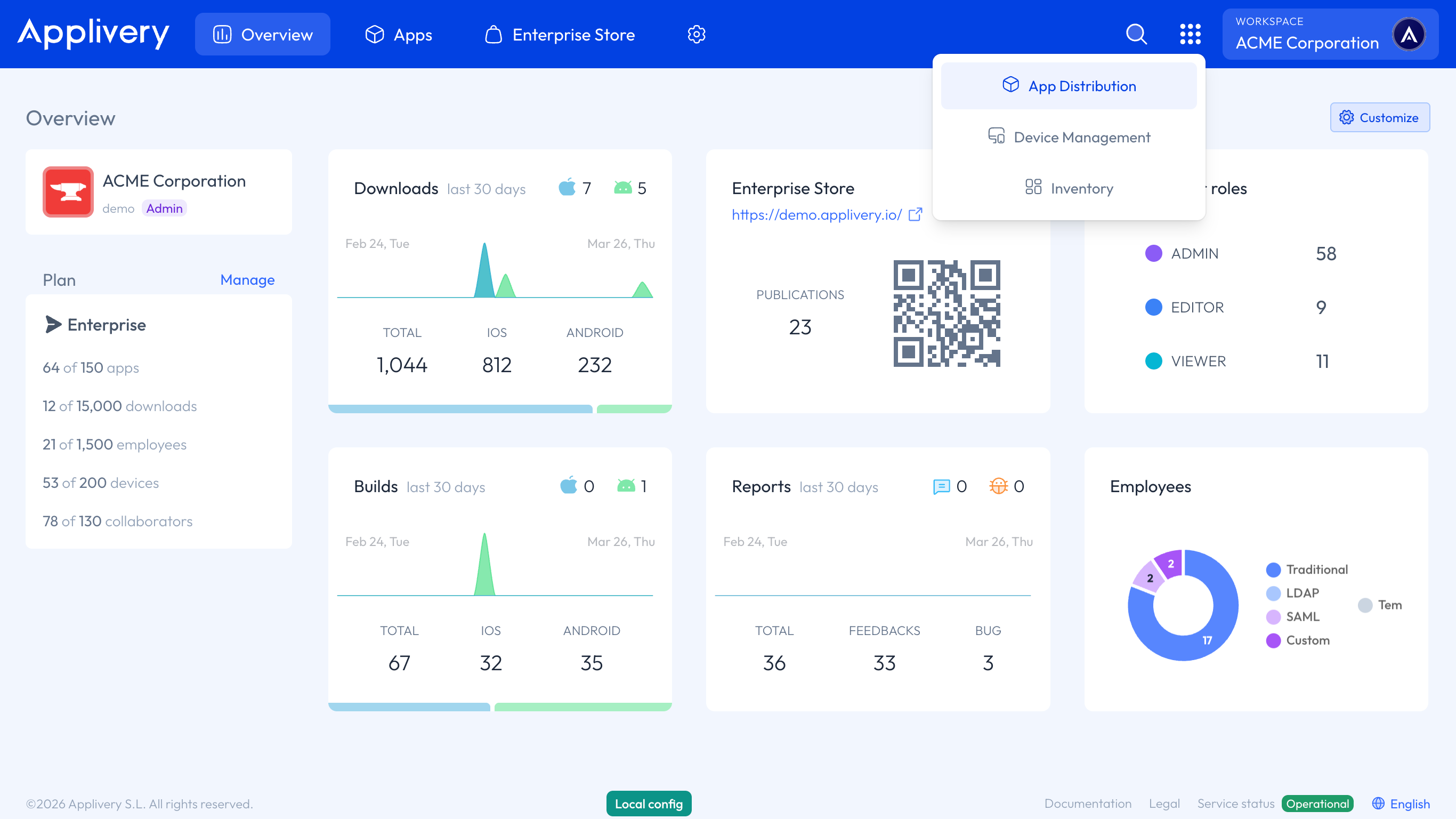
A continuación, inicia sesión en el panel de Applivery y navega a la sección Gestión de Apps. Desde allí, sigue los pasos de nuestra documentación:
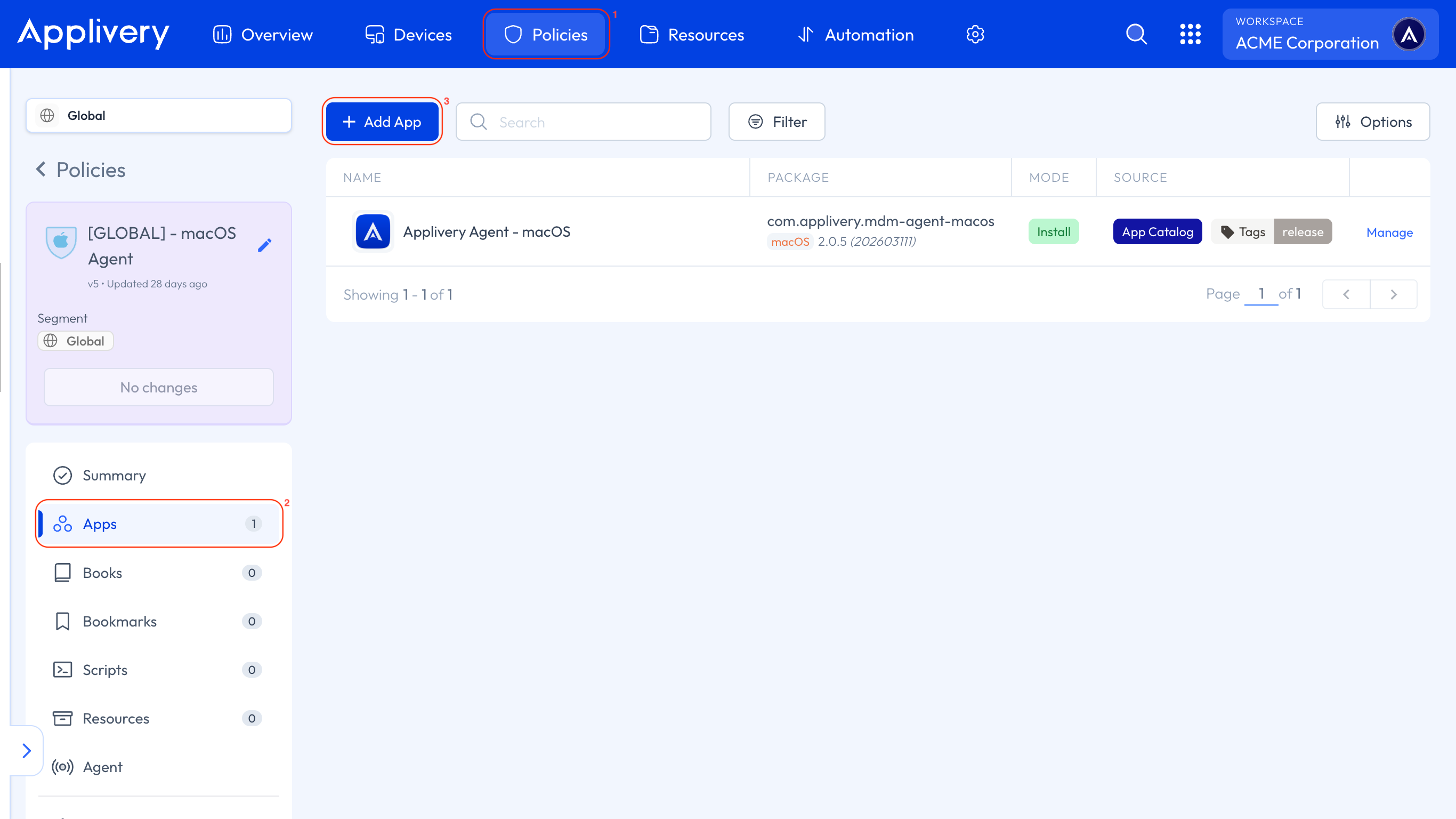
A continuación, dirígete a la sección Gestión de Dispositivos y selecciona cualquiera de tus Políticas 1 o crea una nueva. En el menú lateral izquierdo, selecciona la sección Apps 2 y haz clic en el botón + Añadir App 3.
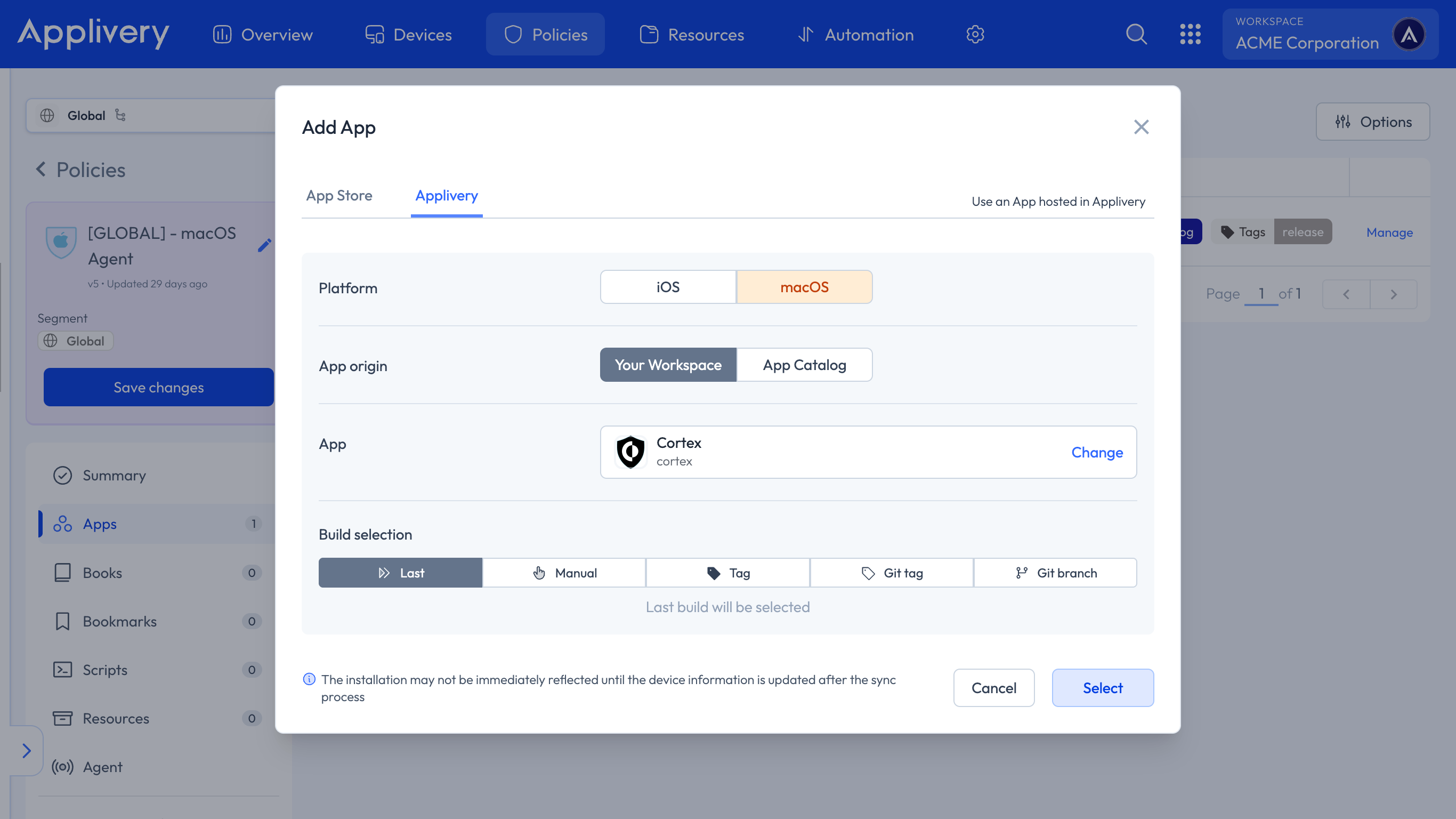
En la vista modal, navega a la pestaña Applivery. Configura la plataforma como macOS, elige Tu Workspace como origen de la app y busca la app Cortex XDR que creaste anteriormente. Para la selección de build, elige Último para asegurarte de que siempre se despliega la versión más reciente.
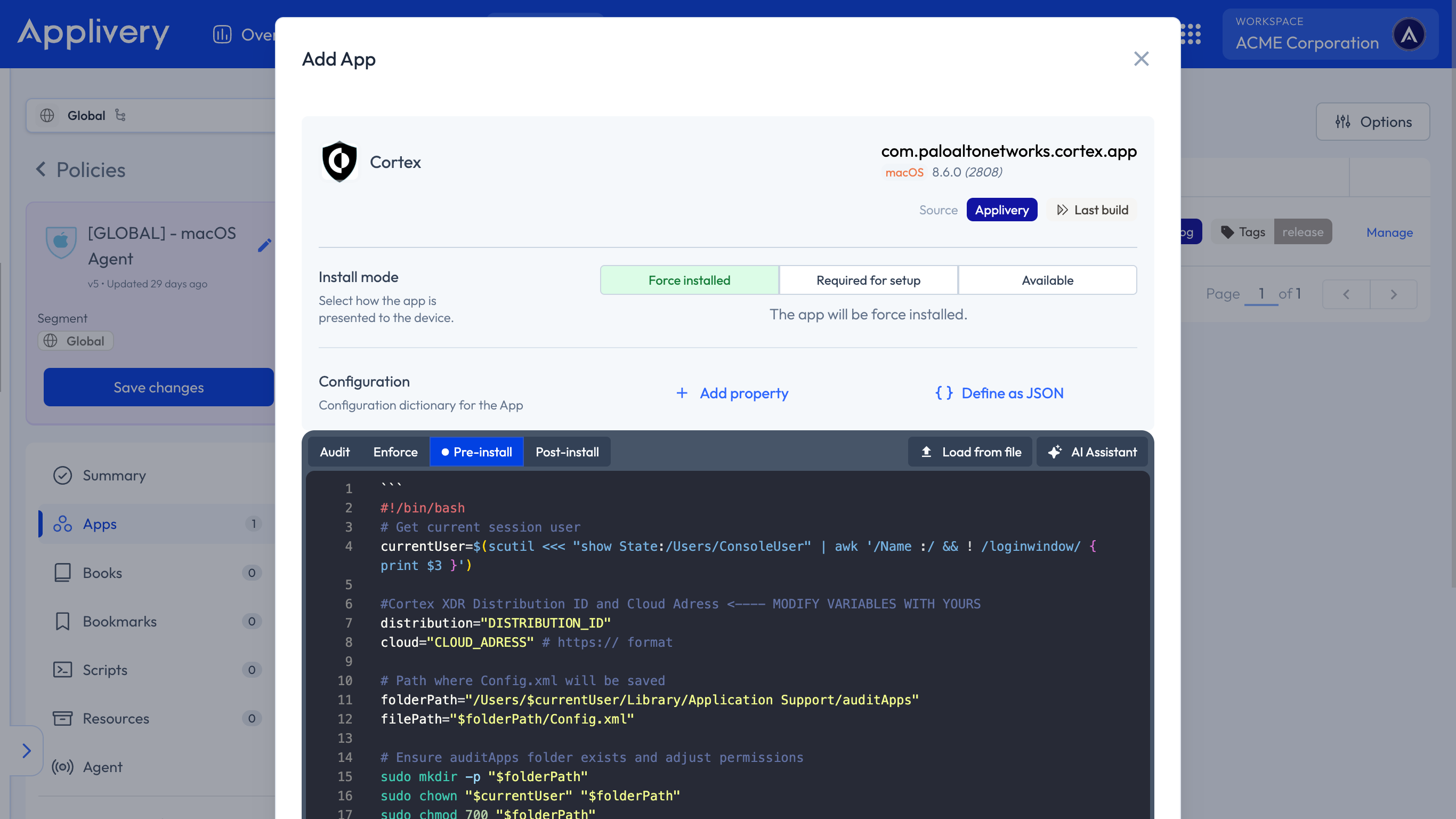
Continúa al siguiente paso y selecciona tu modo de instalación preferido — Instalación forzosa, Necesario para la instalación o Disponible — según tu estrategia de despliegue.
En la sección Configuración, selecciona Pre-install y pega tu script de activación, asegurándote de reemplazar los valores de marcador de posición con tu ID de distribución y dirección Cloud ELB reales.
#!/bin/bash
# Get current session user
currentUser=$(scutil <<< "show State:/Users/ConsoleUser" | awk '/Name :/ && ! /loginwindow/ { print $3 }')

#Cortex XDR Distribution ID and Cloud Address <---- MODIFY VARIABLES WITH YOURS
distribution="DISTRIBUTION_ID"
cloud="CLOUD_ADDRESS" # https:// format

# Path where Config.xml will be saved
folderPath="/Users/$currentUser/Library/Application Support/auditApps"
filePath="$folderPath/Config.xml"

# Ensure auditApps folder exists and adjust permissions
sudo mkdir -p "$folderPath"
sudo chown "$currentUser" "$folderPath"
sudo chmod 700 "$folderPath"

# Write content to Config.xml using cat
sudo cat << EOF > "$filePath"

    $distribution
    $cloud

EOF

# Adjust file permissions
sudo chown "$currentUser" "$filePath"
sudo chmod 600 "$filePath"

sudo installer -applyChoiceChangesXML "/Users/$currentUser/Library/Application Support/auditApps/Config.xml" -pkg "/Users/$currentUser/Library/Application Support/auditApps/Cortex XDR.pkg" -target /

# Verify if the file was created successfully
if [[ -f "$filePath" ]]; then
    echo "Config.xml created at $filePath"
else
    echo "Error creating Config.xml"
    exit 1
fi
Para aplicar la configuración personalizada, navega a la política deseada y haz clic en + Añadir configuración en el menú del lado izquierdo. Luego, selecciona el botón + Importar y pega el contenido .xml proporcionado en el editor:
<?xml version="1.0" encoding="UTF-8"?>
<!DOCTYPE plist PUBLIC "-//Apple//DTD PLIST 1.0//EN" "http://www.apple.com/DTDs/PropertyList-1.0.dtd">
<plist version="1.0">
<dict>
	<key>PayloadContent</key>
	<array>
		<dict>
			<key>PayloadDisplayName</key>
			<string>Cortex XDR Privacy Preferences Policy Control</string>
			<key>PayloadIdentifier</key>
			<string>com.apple.TCC.configuration-profile-policy.7388C706-49BA-4067-BADE-8D031B084B69</string>
			<key>PayloadType</key>
			<string>com.apple.TCC.configuration-profile-policy</string>
			<key>PayloadUUID</key>
			<string>7388C706-49BA-4067-BADE-8D031B084B69</string>
			<key>PayloadVersion</key>
			<integer>1</integer>
			<key>Services</key>
			<dict>
				<key>Accessibility</key>
				<array>
					<dict>
						<key>Allowed</key>
						<true/>
						<key>CodeRequirement</key>
						<string>identifier "com.paloaltonetworks.cortex.agent" and anchor apple generic and certificate 1[field.1.2.840.113635.100.6.2.6] /* exists */ and certificate leaf[field.1.2.840.113635.100.6.1.13] /* exists */ and certificate leaf[subject.OU] = PXPZ95SK77</string>
						<key>Identifier</key>
						<string>com.paloaltonetworks.cortex.agent</string>
						<key>IdentifierType</key>
						<string>bundleID</string>
						<key>StaticCode</key>
						<false/>
					</dict>
				</array>
				<key>SystemPolicyAllFiles</key>
				<array>
					<dict>
						<key>Allowed</key>
						<true/>
						<key>CodeRequirement</key>
						<string>identifier "com.paloaltonetworks.traps.securityextension" and anchor apple generic and certificate 1[field.1.2.840.113635.100.6.2.6] /* exists */ and certificate leaf[field.1.2.840.113635.100.6.1.13] /* exists */ and certificate leaf[subject.OU] = PXPZ95SK77</string>
						<key>Identifier</key>
						<string>com.paloaltonetworks.traps.securityextension</string>
						<key>IdentifierType</key>
						<string>bundleID</string>
						<key>StaticCode</key>
						<false/>
					</dict>
					<dict>
						<key>Allowed</key>
						<true/>
						<key>CodeRequirement</key>
						<string>identifier pmd and anchor apple generic and certificate 1[field.1.2.840.113635.100.6.2.6] /* exists */ and certificate leaf[field.1.2.840.113635.100.6.1.13] /* exists */ and certificate leaf[subject.OU] = PXPZ95SK77</string>
						<key>Identifier</key>
						<string>/Library/Application Support/PaloAltoNetworks/Traps/bin/pmd</string>
						<key>IdentifierType</key>
						<string>path</string>
						<key>StaticCode</key>
						<false/>
					</dict>
				</array>
			</dict>
		</dict>
		<dict>
			<key>AllowUserOverrides</key>
			<true/>
			<key>AllowedSystemExtensions</key>
			<dict>
				<key>PXPZ95SK77</key>
				<array>
					<string>com.paloaltonetworks.traps.securityextension</string>
					<string>com.paloaltonetworks.traps.networkextension</string>
				</array>
			</dict>
			<key>PayloadDisplayName</key>
			<string>Cortex XDR System Extensions</string>
			<key>PayloadIdentifier</key>
			<string>com.apple.system-extension-policy.93526FBD-2421-4402-9CAF-210780E2D0FF</string>
			<key>PayloadType</key>
			<string>com.apple.system-extension-policy</string>
			<key>PayloadUUID</key>
			<string>93526FBD-2421-4402-9CAF-210780E2D0FF</string>
			<key>PayloadVersion</key>
			<integer>1</integer>
		</dict>
		<dict>
			<key>FilterDataProviderBundleIdentifier</key>
			<string>com.paloaltonetworks.traps.networkextension</string>
			<key>FilterDataProviderDesignatedRequirement</key>
			<string>identifier "com.paloaltonetworks.traps.networkextension" and anchor apple generic and certificate 1[field.1.2.840.113635.100.6.2.6] /* exists */ and certificate leaf[field.1.2.840.113635.100.6.1.13] /* exists */ and certificate leaf[subject.OU] = PXPZ95SK77</string>
			<key>FilterGrade</key>
			<string>firewall</string>
			<key>FilterPacketProviderBundleIdentifier</key>
			<string>com.paloaltonetworks.traps.networkextension</string>
			<key>FilterPacketProviderDesignatedRequirement</key>
			<string>identifier "com.paloaltonetworks.traps.networkextension" and anchor apple generic and certificate 1[field.1.2.840.113635.100.6.2.6] /* exists */ and certificate leaf[field.1.2.840.113635.100.6.1.13] /* exists */ and certificate leaf[subject.OU] = PXPZ95SK77</string>
			<key>FilterPackets</key>
			<false/>
			<key>FilterSockets</key>
			<true/>
			<key>FilterType</key>
			<string>Plugin</string>
			<key>PayloadDescription</key>
			<string>Content Filter for the Cortex XDR agent network extension</string>
			<key>PayloadDisplayName</key>
			<string>Cortex XDR Network Content Filter</string>
			<key>PayloadIdentifier</key>
			<string>com.apple.webcontent-filter.CA9C208A-EC6D-4565-864D-02B30DE9D56A</string>
			<key>PayloadType</key>
			<string>com.apple.webcontent-filter</string>
			<key>PayloadUUID</key>
			<string>CA9C208A-EC6D-4565-864D-02B30DE9D56A</string>
			<key>PayloadVersion</key>
			<integer>1</integer>
			<key>PluginBundleID</key>
			<string>com.paloaltonetworks.cortex.app</string>
			<key>UserDefinedName</key>
			<string>Cortex XDR Network Filter</string>
		</dict>
		<dict>
			<key>NotificationSettings</key>
			<array>
				<dict>
					<key>AlertType</key>
					<integer>1</integer>
					<key>BadgesEnabled</key>
					<true/>
					<key>BundleIdentifier</key>
					<string>com.paloaltonetworks.traps-agent</string>
					<key>CriticalAlertEnabled</key>
					<true/>
					<key>GroupingType</key>
					<integer>0</integer>
					<key>NotificationsEnabled</key>
					<true/>
					<key>PreviewType</key>
					<integer>0</integer>
					<key>ShowInCarPlay</key>
					<true/>
					<key>ShowInLockScreen</key>
					<true/>
					<key>ShowInNotificationCenter</key>
					<true/>
					<key>SoundsEnabled</key>
					<true/>
				</dict>
				<dict>
					<key>AlertType</key>
					<integer>1</integer>
					<key>BadgesEnabled</key>
					<true/>
					<key>BundleIdentifier</key>
					<string>com.paloaltonetworks.cortex.agent</string>
					<key>CriticalAlertEnabled</key>
					<true/>
					<key>GroupingType</key>
					<integer>0</integer>
					<key>NotificationsEnabled</key>
					<true/>
					<key>PreviewType</key>
					<integer>0</integer>
					<key>ShowInCarPlay</key>
					<true/>
					<key>ShowInLockScreen</key>
					<true/>
					<key>ShowInNotificationCenter</key>
					<true/>
					<key>SoundsEnabled</key>
					<true/>
				</dict>
			</array>
			<key>PayloadDisplayName</key>
			<string>Cortex XDR Notifications</string>
			<key>PayloadIdentifier</key>
			<string>com.apple.notificationsettings.FE495ADF-1E68-4486-9BB6-0E75D6C3177E</string>
			<key>PayloadType</key>
			<string>com.apple.notificationsettings</string>
			<key>PayloadUUID</key>
			<string>FE495ADF-1E68-4486-9BB6-0E75D6C3177E</string>
			<key>PayloadVersion</key>
			<integer>1</integer>
		</dict>
		<dict>
			<key>PayloadDisplayName</key>
			<string>Cortex XDR Managed Login Items</string>
			<key>PayloadIdentifier</key>
			<string>com.apple.servicemanagement.1645DB60-CBC6-4AE2-A679-BC52DD4C85CE</string>
			<key>PayloadType</key>
			<string>com.apple.servicemanagement</string>
			<key>PayloadUUID</key>
			<string>1645DB60-CBC6-4AE2-A679-BC52DD4C85CE</string>
			<key>PayloadVersion</key>
			<integer>1</integer>
			<key>Rules</key>
			<array>
				<dict>
					<key>Comment</key>
					<string>Allows Cortex XDR launch daemons and launch agents</string>
					<key>RuleType</key>
					<string>LabelPrefix</string>
					<key>RuleValue</key>
					<string>com.paloaltonetworks.cortex</string>
					<key>TeamIdentifier</key>
					<string>PXPZ95SK77</string>
				</dict>
			</array>
		</dict>
	</array>
	<key>PayloadDescription</key>
	<string>Cortex XDR Config: PPPC + SE + Content Filter + Notifications + BTM</string>
	<key>PayloadDisplayName</key>
	<string>Cortex XDR Agent Unified Config Profile v5</string>
	<key>PayloadIdentifier</key>
	<string>com.paloaltonetworks.cortex.AA16E926-D153-4B2E-B4CC-342BB</string>
	<key>PayloadOrganization</key>
	<string>Palo Alto Networks</string>
	<key>PayloadRemovalDisallowed</key>
	<true/>
	<key>PayloadScope</key>
	<string>System</string>
	<key>PayloadType</key>
	<string>Configuration</string>
	<key>PayloadUUID</key>
	<string>AA16E926-D153-4B2E-B4CC-342BB</string>
	<key>PayloadVersion</key>
	<integer>1</integer>
	<key>TargetDeviceType</key>
	<integer>5</integer>
</dict>
</plist>
Una vez hecho, asegúrate de Guardar cambios para aplicar la configuración.